Inside Music Artist Manager's public artist page, and what's actually
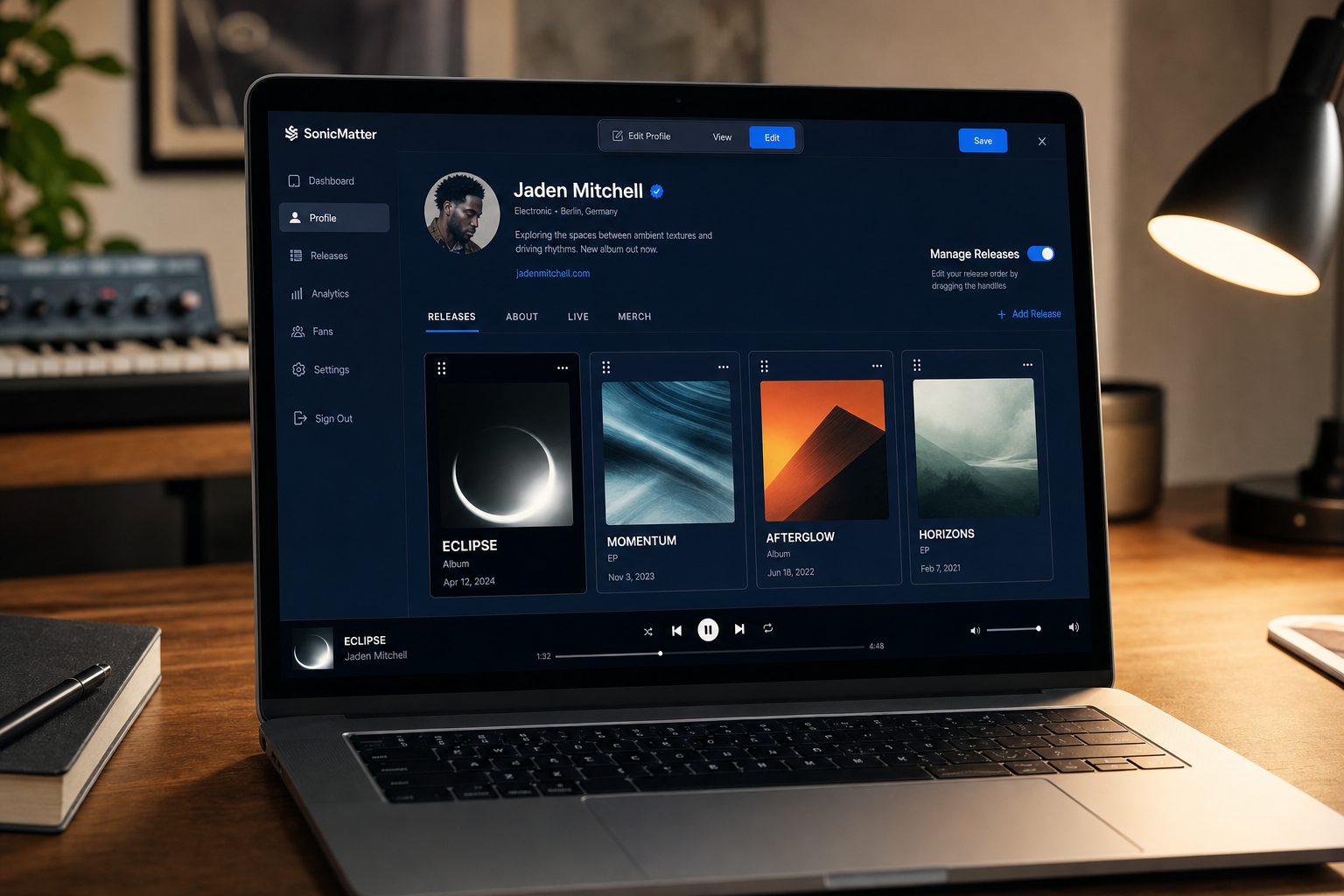
Edit your artist page on the page itself, not buried in settings — releases, links and sections update exactly where visitors see them.

Key Takeaways
Every artist on Music Artist Manager gets a public page at /p/<handle> you can send to journalists, curators and collaborators instead of a generic social profile.
Visit your own page with ?manage=1 and everything a visitor sees becomes directly editable on the page itself through a named toolbar.
The releases section lists current releases and back catalogue together in one list with one add button, search Spotify to import or enter manually for unreleased work.
Drag-and-drop reordering sets the exact order visitors see, so you can feature a new single above older catalogue entries without touching a CMS.
Most artists send journalists and playlist curators to a Linktree, an Instagram bio, or a PDF one-sheet. Music Artist Manager gives you a single public page that shows your releases, links and profile in one place, and lets you edit everything directly on the live page rather than inside a separate dashboard. Here's how it works, what it replaces, and why the in-place editing matters more than it sounds.
Most profile builders bury their editors three clicks deep, in a settings drawer nobody remembers how to find. You make changes in one tab, save, then refresh another tab to check what a visitor actually sees. When a journalist messages on Tuesday asking for a one-sheet before Thursday, you waste half an hour remembering where the bio field lives.
Music Artist Manager's public artist page does something simpler: everything a visitor sees can be edited directly on the page they're looking at. Add `/p/<yourhandle>?manage=1` to your own page URL, and a toolbar appears naming each action. Edit details. Reorder releases. Add a showcase. Switch to 'view as a visitor' to confirm what everyone else sees. No separate dashboard. No settings maze. The public-facing content lives on the page you're sending people to.
This matters if you're sending the same page to a playlist curator, a booking agent and a writer from The Fader in the same week. All three need to see your current releases, your links and a way to reach you. None of them should land on a Linktree that hasn't been updated since your last single, or an Instagram bio with a dead Eventbrite link still pinned at the top.
What the page actually contains
Your public artist page at `/p/<yourhandle>` shows:
- Releases section: current releases and back catalogue in one list, with artwork, title, and optional DSP links per release (Spotify, Apple Music, others on paid plans).
- Profile audio player: play a release or an unreleased demo directly on the page, so someone can hear your work without leaving for Spotify.
- Showcase grid: a visual grid for music videos, press shots, live session clips, whatever represents the work beyond streaming.
- Links and contact: direct ways to reach out or find you elsewhere, editable in place.
- Data readiness widget: scores how complete the profile currently is and names the specific missing fields with a prompt for each, so you're not guessing what else to fill in.
Releases and catalogue entries share the same add mechanism. One modal, one function, one underlying table. The difference is a status field: current or archived. This means adding a back catalogue entry uses exactly the same workflow as adding a new single, rather than forcing you to learn two separate systems. Drag-and-drop reordering sets the order visitors see, so you can feature a new release above an older catalogue entry without deleting anything.
How adding a release actually works
You have two routes when adding a release:
1. Search Spotify directly. Music Artist Manager calls `/api/spotify/search` using client credentials and returns results you can import, pulling title, artwork and metadata rather than making you retype everything by hand.
2. Enter a release manually for anything not on Spotify, including something unreleased. Same modal, same fields, no Spotify ID required.
Both routes use the same add button on the page. Once releases exist, they appear to visitors in the order you set via drag-and-drop, backed by `/api/profile/release-order`.
Back catalogue import uses the exact same mechanism with status set to archived. If you're a manager onboarding an artist with 15 catalogue entries spread across SoundCloud, Bandcamp and a label page nobody remembers the password for, you're not switching between different tools or importing formats. Add each release the same way you'd add this week's single.
Why inline editing is a mechanical advantage, not a convenience claim
Most profile builders separate the editor from the public view because that's how content management systems have worked since 2005. You log in. You edit. You preview. You publish. That workflow makes sense if you're updating a corporate site once a quarter. It makes no sense if you're a manager refreshing an artist page ten minutes before forwarding it to a booking agent.
Inline editing means visiting your own page with `?manage=1` appended to the URL. The toolbar appears at the top, naming each action:
- Edit details (bio, location, social links)
- Edit sections (add or remove showcase, audio player, contact)
- Reorder releases
- View as a visitor
No settings drawer. No second tab. The page you're editing is the page a visitor sees, and switching between modes is instant. When a curator messages asking for your Spotify link and you realise it's missing, you add it on the page, switch to visitor view to confirm it appears correctly, then copy the URL and reply. That's thirty seconds, not a ten-minute settings hunt.
Account settings remain separate and only hold things nobody else should see: billing, security, notification preferences. Public-facing content lives entirely on `/p/<yourhandle>`, so the distinction between what's yours and what's public is mechanical, not conceptual.
Who this page replaces
If you're currently sending people to a scattered mix of Linktree, Instagram bio, and a PDF one-sheet you update manually in Canva, you're managing three separate sources of truth. When you drop a new single, you update the Linktree first, then remember to update the Instagram bio two days later, then update the PDF when someone specifically asks for it. By then the single's been out for a week and half your outreach went to a page showing last month's release.
Music Artist Manager's public page keeps itself current as you add releases. The releases section updates immediately. The showcase grid reflects whatever you've added most recently. If you remove a link or archive an old release, the public page reflects that the moment you save. One page. One URL. One place to send everyone.
This matters most when you're managing outreach in a release window. Playlist curators, booking agents, journalists, potential sync partners and label A&R all need to see the same information at the same time. Sending each of them a different link, or sending the same link that's three weeks out of date, costs you credibility before the conversation starts.
Plan tiers and DSP link availability
Portfolio item caps and customisation levels are tiered by plan. Three customisation levels exist across the pricing structure. DSP links per release (Spotify, Apple Music, and others) are a paid-plan feature, not available on every tier.
If you're on a plan without DSP links enabled, visitors see release title and artwork but no outbound links to streaming platforms. You can still add releases, reorder them and play audio directly on the page via the profile audio player. The core page structure and inline editor are available regardless of plan. The cap on how many showcase items or releases you can display increases with each tier.
This isn't paywalling the entire page. It's a commission comparator. If a manager's standard rate is 15% to 20% of an artist's income, and a subscription tier costs £15 per month, that breaks even at £100 per month in tracked income. The question isn't whether the page costs money. The question is whether the time saved and the outreach consistency gained are worth more than the subscription.
What's built but not yet live
A progressive enrichment mode exists that asks for one missing field at a time, in context, rather than showing a full data readiness widget. It's built but switched off. Don't expect that behaviour yet.
A per-release opt-in to show an unreleased demo publicly also exists, but it's recent and partial. Treat it as an available option rather than a fully proven feature. The core use case, showing released tracks and catalogue entries, is stable and shipped.
Why this matters for 'public artist profile' and 'musician portfolio page' searches
Artists comparing Linktree-style tools search for "public artist profile page" and "musician website builder" because they want one page they control, not a social profile that could change format or disappear. The intent is specific: a URL to send to industry contacts that shows releases, links and a way to get in touch.
The genuinely differentiating detail isn't that Music Artist Manager offers a profile page. It's that you edit everything in place, on the live page, rather than in a separate dashboard. That's a mechanical fact, not a vague claim of being easier to use. When you need to update the page before forwarding it to someone, you're editing the actual page they'll land on, not a preview of a page you hope looks right after publishing.
If the alternative is juggling a Linktree, a bio doc and a PDF one-sheet across three tools, the advantage isn't features. It's consolidation. One page. One editor. One URL. The fewer places your release information lives, the fewer places it goes out of date.
Related Reading:
- Link in bio for musicians: How profile blocks work inside Music Artist Manager — Music Artist Manager
- The 'pre-mortem' release: How anticipating failure saves your indie campaign — Music Artist Manager
- The equity advocate: Why your music manager should prioritize human preservation over profit — Music Artist Manager
Ready to plan your next release?
Stop piecing together spreadsheets and scattered notes. Get your free release strategy and keep your whole rollout in one place.
Written By
Gavin Alexander
Senior Marketeer
As the founder of Music Artist Manager, Gavin has spent years at the intersection of music and technology. Seeing firsthand how chaotic release rollouts and split sheets can be, he designed a platform that brings major-label infrastructure to independent artists and their teams. He writes extensively about industry trends, artist leverage, and workflow optimisation.