Contacts: Your music industry network, mapped
A single visual map of every collaborator, client and industry contact arranged by role, with your artist at the centre.

Key Takeaways
Most independent artists keep contacts in three places: phone, email and memory.
Contacts gives you one place to store every team member, collaborator and industry connection with their role attached.
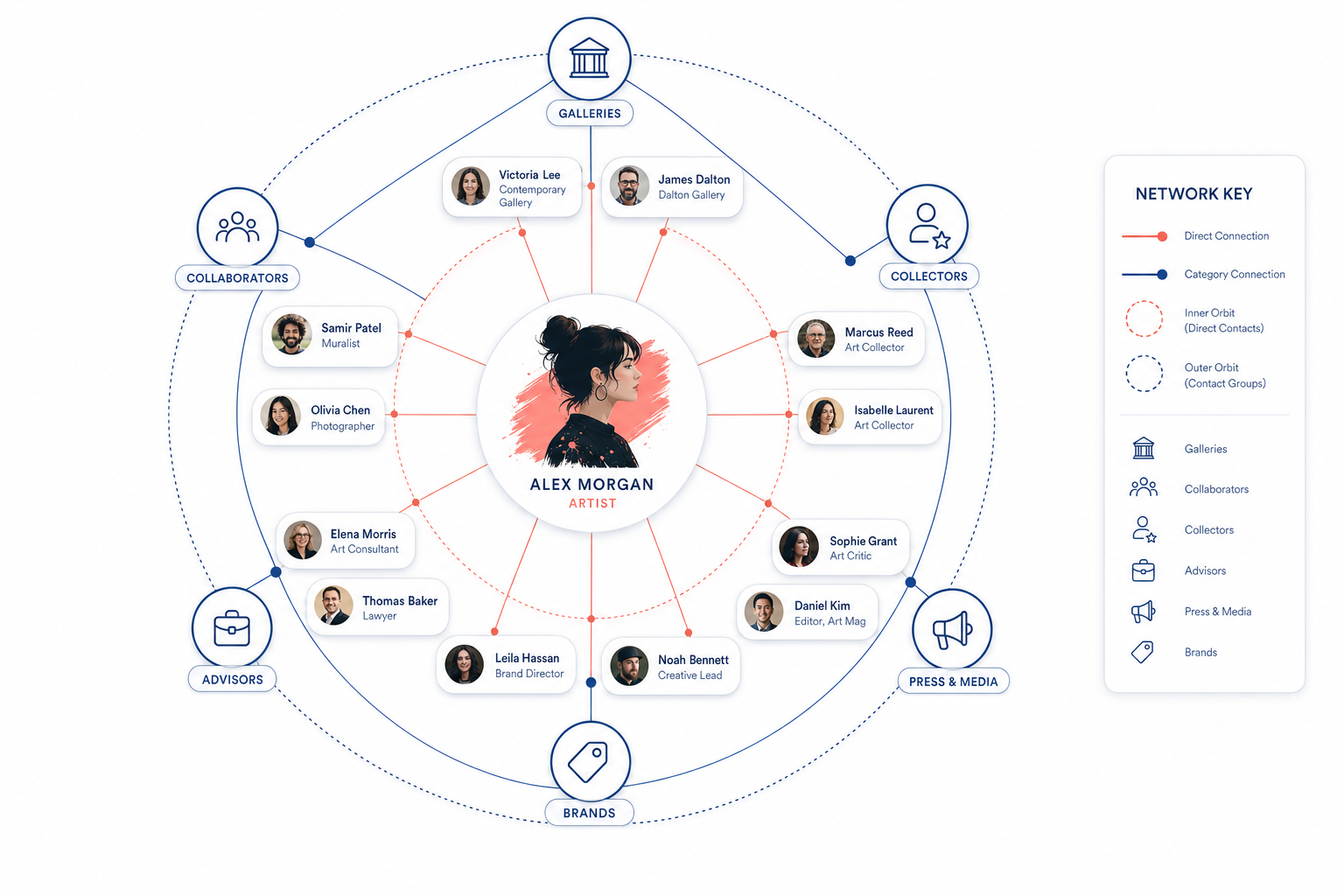
The Network Graph shows your professional web as a visual map, not a flat list.
You see who connects to what part of your career at a glance, not buried in a spreadsheet.
Most artists keep contacts scattered across their phone, email threads and memory. Contacts puts them in one place with roles attached, then gives you a Network Graph: a visual map of your entire professional web, with you at the centre. It is not a list. It is the shape of your career's relationships, visible at a glance.
If you're managing more than a handful of relationships in this industry, you've already hit the wall. A producer's number is in your phone under "Jamie Studio". The venue booker who gave you three dates last year is filed in email as "Lisa Re: Feb shows". The label A&R you met at a showcase is on Instagram. Your sync agent is somewhere in a Dropbox folder marked "Contacts backup 2022".
A flat list doesn't scale, and it definitely doesn't show you what matters: the shape of your professional web. Who's a collaborator on active projects. Who's a client if you're managing multiple artists. Who's an industry contact you touched base with once and need to see at a glance so you don't forget to follow up before the next campaign window opens.
Contacts, inside Music Artist Manager, fixes this in two parts. First, it's the single place your team members, collaborators, clients and industry contacts live, each with a role attached. Second, it shows you the structure as a network graph: a visual map with you at the centre and every contact arranged around you, grouped by role.
The graph is the distinctive bit. It's not new technology. Force-directed graphs have been used in intelligence analysis and academic research for years. What's new is applying it to the specific, messy reality of an independent artist's or manager's contact structure, where roles matter and relationships layer over time.
Why a list doesn't cut it
A contact list in your phone or a CRM built for SaaS sales assumes every entry is equivalent. It's optimised for search and segmentation, not for showing relationships at speed.
Here's the problem. You're planning a campaign. You need to know, in one glance, which collaborators worked on the last EP, which venue contacts are still warm, and whether your publishing contact is filed under their company name or their personal email. A list makes you scroll, search and remember context. A graph with roles and groupings shows the structure in one view.
This matters more as the contact base grows. At 20 contacts, a list is fine. At 50, you're scrolling past stale entries. At 100, you've lost the shape of who's currently active versus who you worked with two years ago and haven't touched since.
What the network graph actually shows you
Open Contacts at /planner/network. You're at the centre. Every contact radiates out from you, grouped by role. Collaborators cluster together. Clients, if you're managing multiple artists, sit in another group. Industry contacts, venue bookers, label contacts, press, radio, sync agents, all visible as separate clusters.
The grouping is automatic, based on the role you assign when you add or edit a contact. The graph updates as you add people or change roles. You're not drawing it manually. You're maintaining the roles, and the structure emerges.
What this tells you at a glance
- Density by role. If your collaborator cluster is twice the size of your industry contact group, you know where your time's going. If it's the reverse, you know you're spending more time networking than making.
- Stale connections. A contact who hasn't been part of a project in 18 months sits at the edge of the graph. You see them, you decide whether to re-engage or archive.
- Team structure for a campaign. When you're staffing a rollout, the collaborators with roles already assigned are visible in one view, not buried in a spreadsheet tab you have to hunt for.
This is not a public directory. It's not a social network. It's your private map of who you work with, who you've worked with, and who you need to stay warm with as your catalogue and schedule layer up.
How it connects to project work and invitations
Contacts isn't a silo. The same role system that powers the network graph feeds into project team management and collaborator invitations elsewhere in Music Artist Manager.
When you're setting up a project, you can assign collaborators and cap access by tier. Those collaborators are drawn from Contacts. When you send a collaborator invitation with a defined role and split, you're working off the same underlying contact and role data that the graph visualises.
This means you define a role once. You don't re-enter a producer's details every time you start a track. You don't re-assign a co-writer's role every time you open a split sheet. The contact exists, the role is set, and the system surfaces them where you need them.
What this is not
Contacts is not a CRM with deal stages, pipeline tracking or automated outreach sequences. It doesn't score leads, flag opportunities or export reports on conversion. That's not the job.
The job is to give you a single, role-aware place for everyone you work with, and to show you the structure of that network visually so you can make faster, more grounded decisions about who to involve, who to follow up with, and where the gaps are.
If you need a CRM built for cold outreach and sales funnel management, Contacts won't replace it. If you need a way to see your professional web clearly and keep team, client and industry relationships organised without losing the shape of how they all connect back to you, it will.
Who this is built for
This is for independent artists and managers whose contact base has outgrown their phone's address book but who don't want to bolt on a generic CRM built for enterprise software sales.
If you're managing one artist and you've got 30 contacts, a list is probably fine. If you're managing three artists, running co-writes, booking your own shows and staying warm with ten industry contacts across publishing, sync and press, the list breaks down. You need structure, and you need to see that structure without opening six different tools.
The network graph is built for that moment when you realise you can't remember which collaborator worked on which EP, or which venue contact you spoke to last autumn, or whether your sync agent is still at the same company. One view. Roles assigned. The shape of your whole professional setup visible in a force-directed graph with you at the centre.
How to start using it
Add your contacts. Assign roles. The graph builds itself.
Start with your active team: collaborators on current projects, any clients if you're managing multiple artists, the industry contacts you've spoken to in the last six months. Don't try to import every phone contact or LinkedIn connection you've ever made. Import the people who matter to your current and next campaign.
As the contact base grows, the graph shows you where the density is. If your collaborator cluster is thin, you know you need to build that side of the network. If your industry contact group hasn't grown in a year, you know where the gap is.
The graph doesn't make decisions for you. It shows you the structure so you can make decisions faster and with better context than a flat list ever gave you.
The takeaway
Your contacts live in too many places, and a list doesn't show you the shape of who you work with. Contacts in Music Artist Manager gives you one place, with roles, and a network graph that maps your whole professional web visually.
It's not a CRM. It's not a social network. It's the single place your team, collaborators, clients and industry contacts live, with the structure visible in one view so you can staff a campaign, follow up on a warm contact or see where the gaps are without scrolling through a list that stopped making sense 50 entries ago.
If your contact base is scattered and you've lost the shape of your network, Contacts puts it back in one place. With roles. With structure. And with you at the centre.
Related Reading:
- Adding collaborators to a project in Music Artist Manager, with roles that actually mean something — Music Artist Manager
- The 'pre-mortem' release: How anticipating failure saves your indie campaign — Music Artist Manager
- The Multi-Return rule: Why every promotional pound must do more than one job — Music Artist Manager
Ready to plan your next release?
Stop piecing together spreadsheets and scattered notes. Get your free release strategy and keep your whole rollout in one place.
Written By
Gavin Alexander
Senior Marketeer
As the founder of Music Artist Manager, Gavin has spent years at the intersection of music and technology. Seeing firsthand how chaotic release rollouts and split sheets can be, he designed a platform that brings major-label infrastructure to independent artists and their teams. He writes extensively about industry trends, artist leverage, and workflow optimisation.