From AI chat to checklist: How Music Artist Manager turns a conversation into tasks
How to turn an AI Manager conversation into tracked tasks and calendar dates without retyping a single step.

Key Takeaways
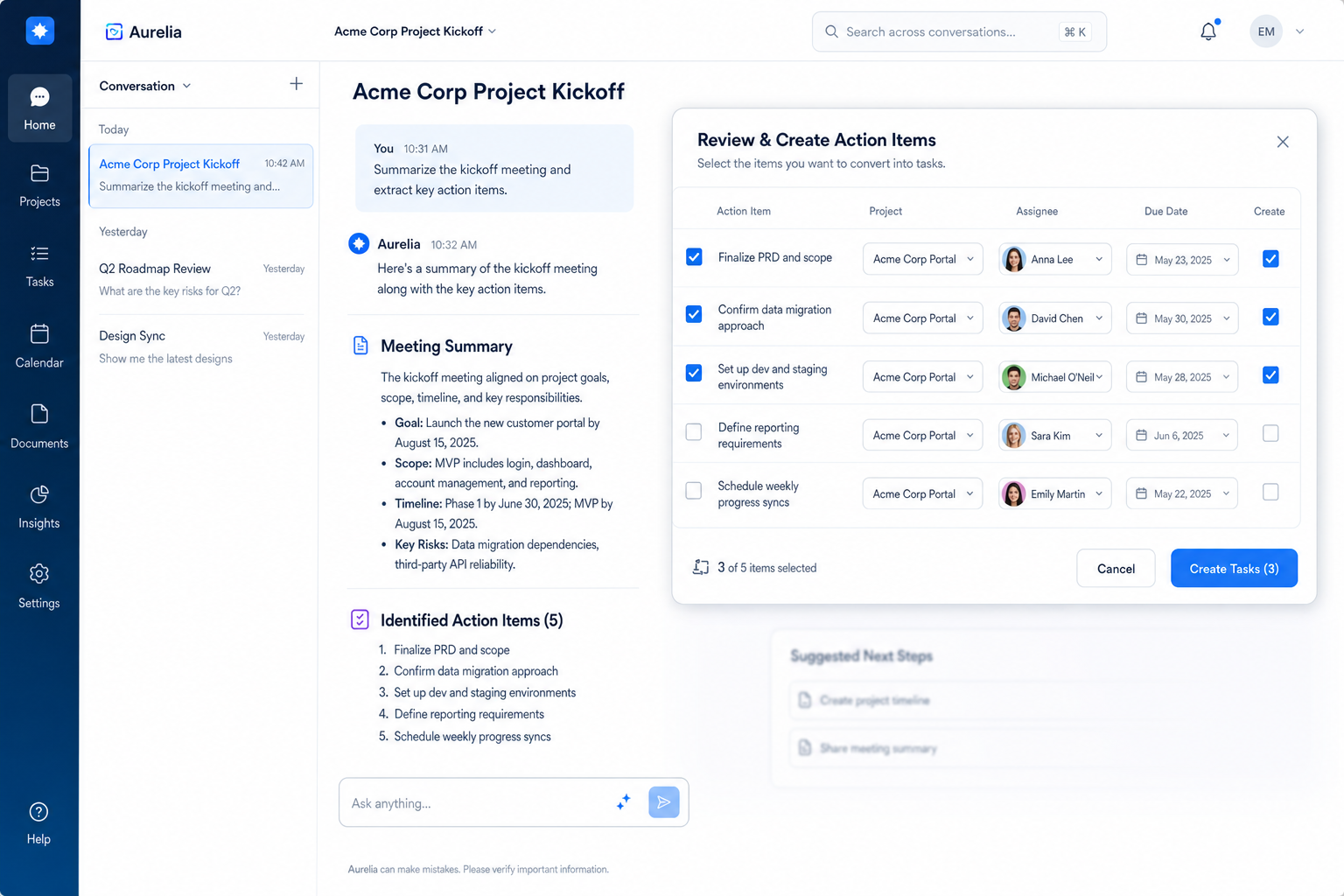
AI Manager chat can detect tasks inside a plan and show them for you to confirm.
Once confirmed, those tasks move straight to your Task Board with no retyping required.
The same mechanism works for schedules: dates go to Calendar, tasks go to Board.
Without this, every step you asked for stays trapped in chat and never becomes trackable work.
Manager chat can now turn a conversation into real, tracked work. When you ask for a plan or a content schedule, Music Artist Manager detects the discrete tasks inside that reply and lets you review them before adding to your Task Board or Calendar. This closes the loop between 'the AI told me what to do' and 'it's actually on my board'.
You ask Manager chat how to sequence a three-single rollout, and it lays out twelve steps: register the ISRC, brief the photographer, file the split sheet two weeks before release one, schedule the pre-save link, book the press send. The advice is good. The problem is what happens next.
Most artists screenshot the reply, or paste it into Notes, or promise themselves they'll come back to it later. By the time they open their task board to actually start work, the plan is nowhere near the board. They're retyping every step by hand, or worse, they've lost track of what the original sequence was.
Music Artist Manager closes that gap. When Manager chat gives you a plan, the system detects the tasks inside the reply, shows them to you for review, and once you confirm, writes them directly to your Task Board under the project you choose. If the plan includes a schedule of dates, the same mechanism can import that schedule into your Calendar. The plan doesn't stop at advice. It becomes tracked work.
Why this exists
An intelligent manager should reduce admin, not create it. If the output of a planning conversation is a paragraph you have to manually parse and retype, you've replaced one problem with another.
Task extraction solves that specifically. The moment Manager chat generates a plan with discrete steps, the system parses those steps, presents them as checkboxes, and waits for you to confirm. Nothing gets added to your board without your review. Once you approve, those tasks land in the right project with the structure intact. You move from "here's what to do" to "it's on my board, and I'm tracking it" in two clicks.
This matters most during release prep, when a single conversation with Manager chat might produce fifteen tasks across rights, production, distribution, marketing and data hygiene. Without extraction, you either lose half of them or waste twenty minutes transcribing. With it, the work starts immediately.
How it works in practice
You're in Manager chat. You type: "I want to release three singles before the album. What's the sequence, and what do I need to register at each stage?"
Manager chat streams its reply. It recommends single one six weeks before the album, single two four weeks out, single three two weeks out. It lists the registration and filing tasks for each: ISRC codes, metadata to your distributor, split sheets to your PRO, pre-save links, press and playlist contacts.
As the reply finishes, the system parses it for task-shaped content. Below the reply, you see a set of checkboxes. Each detected task is listed with its description. You review the list. If a task needs editing or shouldn't be added, you uncheck it. If it looks right, you leave it checked.
You confirm. The system asks which project to assign the tasks to. You choose "Album rollout Q2". The tasks land on your Task Board under that project, in the sequence Manager chat recommended. You open the Task Board, and the entire plan is there, ready to assign, schedule and track.
If the plan included specific dates, the same workflow applies to your Calendar. The detected schedule appears as checkboxes, you review, you confirm, and the dates import.
You haven't retyped a single line. The conversation and the board are connected.
What this removes
Manual transcription. You're not copying tasks from chat into a separate tool or onto paper. The extraction happens in the same interface where the plan was created.
Lost detail. AI-generated plans often include small but critical steps that are easy to miss when you're scanning a paragraph. The extraction makes every step explicit and forces a review before anything commits.
The gap between advice and action. The standard problem with any planning tool, intelligent or not, is that the output lives in one place and your actual work tracker lives somewhere else. Task extraction collapses that gap. The advice becomes the work.
Who this is for
This feature is built for anyone using Manager chat to plan a release, campaign or content schedule and who already works from a task board or calendar. If you treat your work as a set of trackable, completable steps rather than a loose to-do list, task extraction makes Manager chat useful in a way a standalone chatbot never could be.
It's especially relevant during pre-release, when the volume of parallel tasks across rights, creative, marketing and distribution is high and the cost of missing one is real. A forgotten split sheet or a metadata error two days before release isn't a minor inconvenience. It's a delayed payout or a misattributed stream. Task extraction makes sure the steps don't stay in chat.
What not to expect
This is detection and review, not blind automation. The system will not add tasks to your board without you confirming them first. Every detected task appears as a checkbox. You control what lands and where.
It only applies to replies that contain plan-shaped or schedule-shaped content. If you ask Manager chat a question that produces a paragraph of advice without discrete steps, there are no tasks to extract. The system doesn't force structure where none exists.
This is not a separate tool. Task extraction happens inside Manager chat. You don't export a file or switch to another view. The workflow is part of the same conversation where the plan was created.
The mechanic that matters
Task extraction does one thing well: it turns the output of a planning conversation into the input for your actual work system, without you havingering to bridge the gap manually. The plan doesn't end when the reply finishes streaming. It moves straight onto your board, under the project you're running, in a format you can track.
That's the difference between a tool that gives advice and a tool that runs with you. Manager chat produces the plan. Task extraction makes sure it doesn't stay advice.
Ready to plan your next release?
Stop piecing together spreadsheets and scattered notes. Get your free release strategy and keep your whole rollout in one place.
Written By
Gavin Alexander
Senior Marketeer
As the founder of Music Artist Manager, Gavin has spent years at the intersection of music and technology. Seeing firsthand how chaotic release rollouts and split sheets can be, he designed a platform that brings major-label infrastructure to independent artists and their teams. He writes extensively about industry trends, artist leverage, and workflow optimisation.