Bring your own AI model: Using my AI inside Music Artist Manager
Connect your own AI model to Music Artist Manager's chat and run it against your real project data, not a blank slate.

Key Takeaways
My AI lets you connect your own model and query it against your real MAM project data.
You keep the model you already trust, but now it answers using your catalogue, splits and release windows.
The other nine personas stay fixed, so you get both consistency and control in one chat interface.
It is built for managers who already have a preferred workflow and do not want to re-enter context elsewhere.
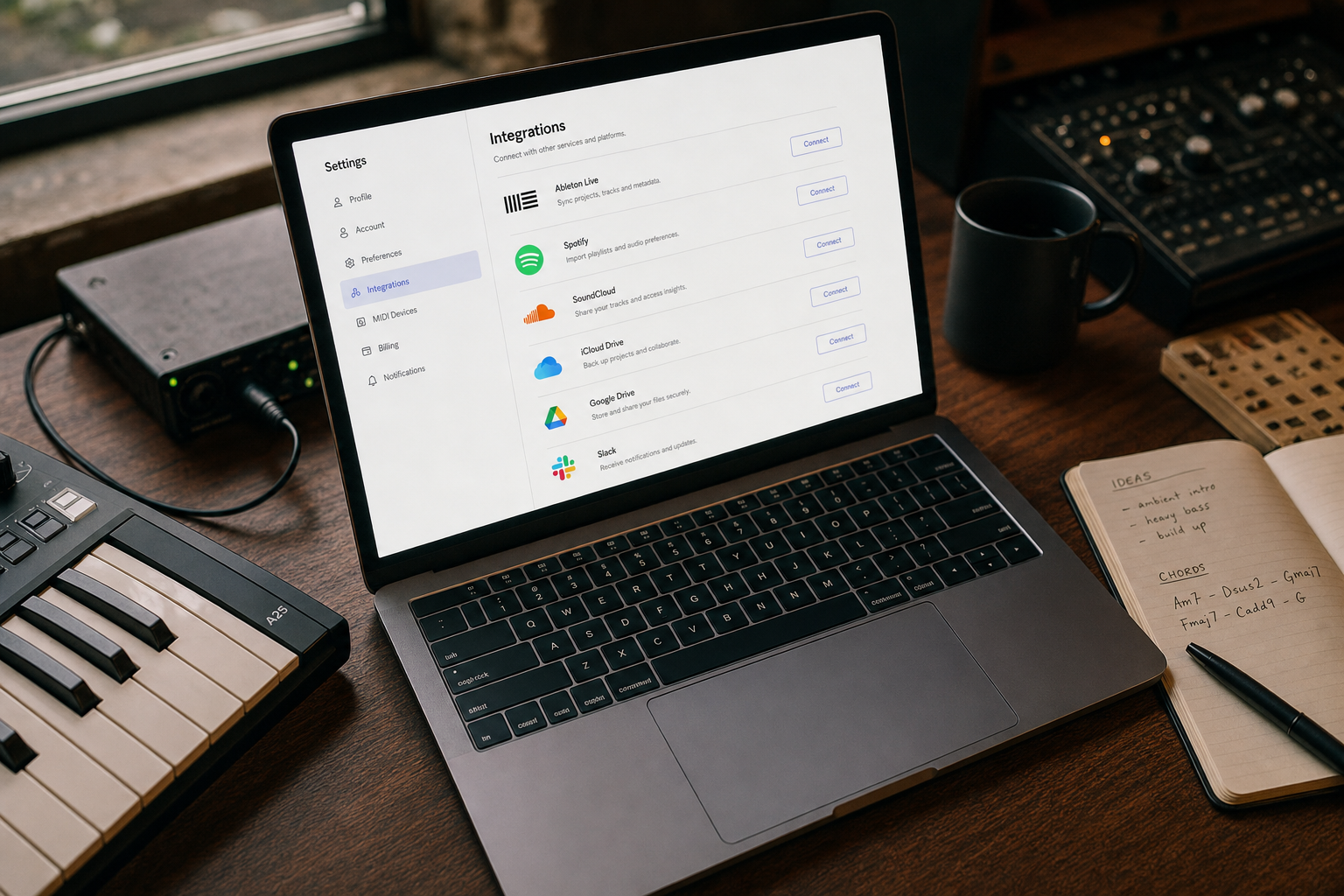
If you already use a specific AI model elsewhere and want it working against your Music Artist Manager data, you can now connect your own. The tenth persona in Manager chat, My AI, is a bring-your-own-model slot. It answers using the same real project context as every other persona, but the model generating the reply is yours, configured once in Settings > Integrations.
Music Artist Manager's AI Manager chat has ten advisor personas. Nine are fixed lenses built into the platform. The tenth, My AI, is different. It is the slot where you connect your own model.
If you already use a specific AI model for other parts of your operation, whether that is because you prefer its output style, you have credit with that provider, or you need a particular capability that model offers, you can now use it inside MAM's chat interface while still working against your project data, splits, release calendar and catalogue. The context comes from MAM. The model answering comes from you.
Why this exists
Some managers and artists have strong preferences around which AI model they work with. That preference is not random. It might be cost, familiarity with how a specific model structures its replies, or trust built over months of use.
The standard nine personas in AI Manager chat use MAM's default routing. They answer using models we have selected, fine-tuned context against, and tested. But we built the tenth slot to be configurable because there is no single "best" model for every operator in every situation. What works for one manager's workflow might not suit another's, and forcing everyone onto one answer engine would ignore that reality.
How my AI works
Go to Settings > Integrations. Connect your own model. Then select My AI as the active persona in AI Manager chat.
Once connected, My AI behaves like every other persona in the chat. It streams replies in real time, extracts tasks and schedule items when relevant, supports voice input and output, and answers using the same system prompt structure every persona uses. That prompt includes your artist profile, active projects, collaborator splits, registered royalties, upcoming releases, and any context you have added through previous chats or project setup.
The difference is which model generates the reply. With My AI, that is the one you connected, not ours.
Who this is for
Technically comfortable managers or artists who already use a specific AI model in another tool and want that same model answering questions about their MAM data.
This is not for everyone. If you do not have a view on which model you prefer, or you have not used AI assistants outside of MAM before, there is no reason to configure My AI. The fixed personas cover strategy, distribution mechanics, tour planning, brand architecture, content, A&R, equity splits, contract review, and executive decision making. Most users will work inside those nine.
But if you do have a model you trust, and you want it working against real project data rather than starting every conversation from scratch elsewhere, this is the mechanism.
What this is not
My AI is the only bring-your-own slot. You cannot swap out the model behind The Distro Hacker or The Tour Veteran. Those personas stay on MAM's routing because their advice depends on context windows, response structures and fallback logic we have built specifically for them.
Connecting your own model to My AI does not bypass MAM's AI credit system for the other nine personas. Credits still apply to those conversations in the same way.
And this is not a workaround for artists who want to avoid learning MAM's interface. My AI still requires you to have set up your project data, registered your splits, and connected your distribution and royalty sources. The model you bring answers using that same information. If the data is not in MAM, the replies will not be grounded.
When to use it
Use My AI when you have a specific model you prefer and a clear reason for that preference.
Do not use it as the first persona you try. Start with one of the fixed lenses. See how they answer against your data. If their output style does not match your workflow, or if you already have a model elsewhere that you know handles certain types of question better for your situation, then configure My AI and test the difference.
The feature exists because some operators have earned strong preferences through real use. If that describes you, the slot is there. If it does not, the other nine personas will cover the work.
Ready to plan your next release?
Stop piecing together spreadsheets and scattered notes. Get your free release strategy and keep your whole rollout in one place.
Written By
Gavin Alexander
Senior Marketeer
As the founder of Music Artist Manager, Gavin has spent years at the intersection of music and technology. Seeing firsthand how chaotic release rollouts and split sheets can be, he designed a platform that brings major-label infrastructure to independent artists and their teams. He writes extensively about industry trends, artist leverage, and workflow optimisation.