Content library: Where your AI-Generated content actually lives
How to stop losing good captions in chat scroll and keep every piece of generated content in one filterable, searchable place.

Key Takeaways
Manager chat gives you a caption you like. Three days later, you cannot find it.
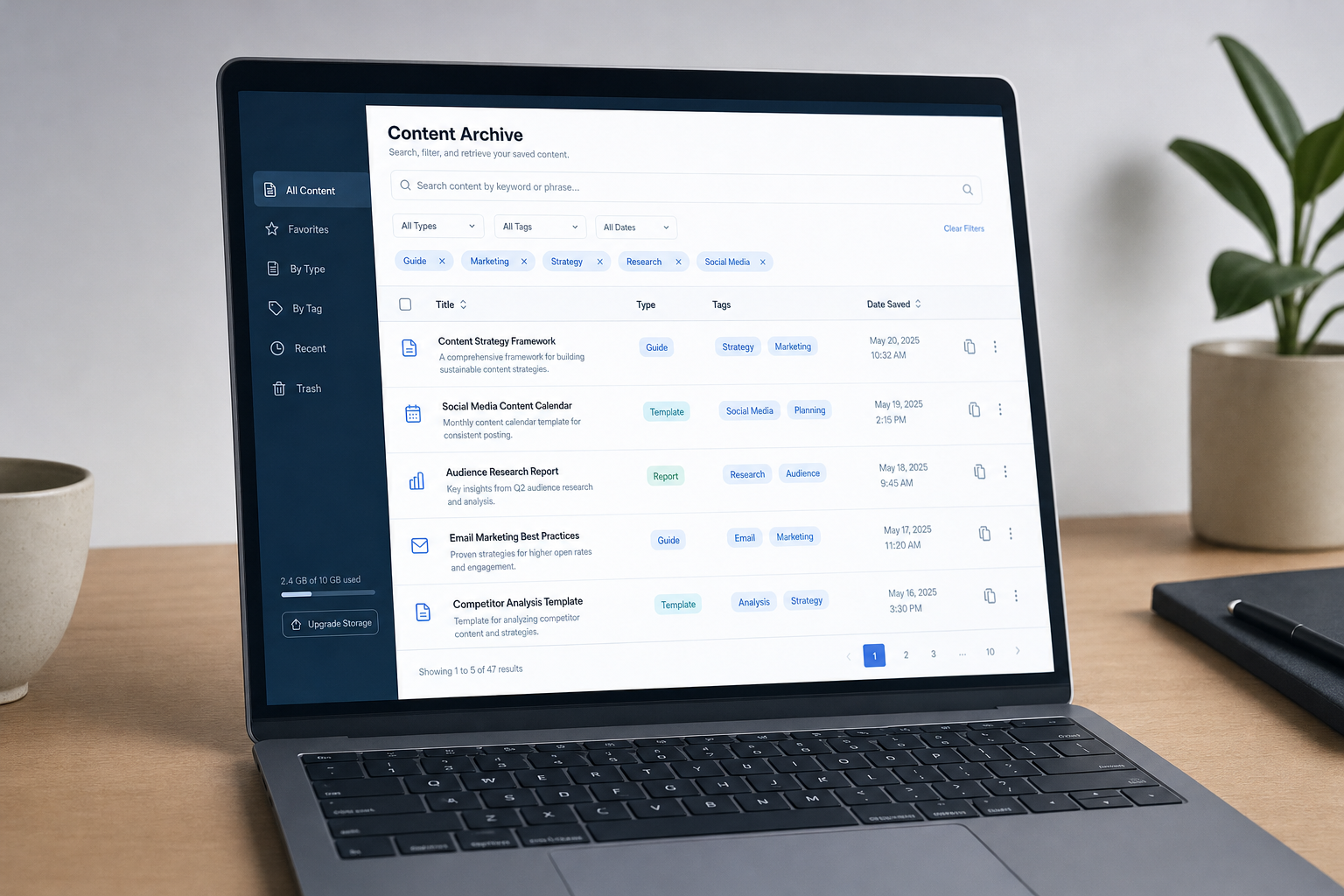
Content Library keeps every piece of output the managers write, searchable and filterable by artist.
If you work across a roster, pull up everything generated for one artist without scrolling back through weeks of chat.
AI output that persists is AI output you can actually use twice.
You ask Manager chat to write a caption. It's good. You copy it somewhere. Three days later you need it again and it's gone, buried in chat history you'll never scroll back through. Content Library fixes that: every piece of output the managers generate for you stays in one searchable place, filterable by artist, ready when you need it.
You asked the manager chat for three caption options. One was good. You copied it somewhere. Where? The Instagram draft box, maybe. A Notes app entry. The same Slack channel where you also dumped a Spotify Canvas idea and a press release draft two days ago.
A week later, you need to reference it. You can't remember which Manager you asked. You scroll back through chat history. It's gone. You rewrite it from scratch or you ask again and get something different.
This is the default failure mode of chat-based tools. The output is as disposable as the conversation that produced it.
What content library is
Content Library is where every piece of content generated by the Manager chat inside Music Artist Manager is stored permanently, independent of the conversation that created it.
Social posts. Email drafts. Research notes. Bio copy. Release announcement text. All of it, in one place, searchable and filterable, at `/planner/content`.
It doesn't matter which of the eight functional Managers or The Executive Council you asked. It doesn't matter when you asked. If it was generated in Manager chat, it's in Content Library.
Why this solves a real problem
Manager chat happens at `/planner/ai`. It's where you generate the work. But chat history scrolls. You run five conversations in a day across three artists. The caption you liked is now fifteen messages back, mixed in with tour budget notes and a Spotify pitch draft for someone else.
Content Library fixes this. It persists the output as its own record, with metadata attached: which artist it relates to, when it was created, what type of content it is.
For managers running a roster, the filter function is the operational piece. You're managing three artists. You need to pull up everything written for Artist B this month. You filter by name. It's there.
For solo artists managing themselves, it's still a live reference library. You're two months into a campaign. You want to see how you positioned the single in the first announcement email versus how you framed it in the third social push. You search "single title". Both drafts are there, with the date stamps.
What it isn't
Content Library is not a scheduler. It doesn't post anything. It doesn't connect to Instagram, Twitter or TikTok. It doesn't set publish dates or queue up content in a calendar view.
It's storage. Permanent, searchable, filterable storage for the content Managers generate. You still copy the caption into Instagram yourself. You still paste the email draft into your email client. The difference is that you can find it again tomorrow.
How it fits your actual workflow
You're prepping a release. You ask the Marketing Manager for caption options. Three come back. You pick one, copy it into Instagram, schedule the post.
That caption is now in two places. Instagram's draft queue, where it'll disappear after the post goes live. And Content Library, where it stays.
Three weeks later, you're writing the second single announcement. You want to reference the tone and structure of the first. You open Content Library. Filter by artist. Search "single one title". The original caption is there. You don't need to find the chat. You don't need to ask again.
You're running a roster. You've generated email copy for Artist A, social posts for Artist B, and a Spotify pitch for Artist C. You need to review everything written for Artist B this week before their album drops Friday. You filter by Artist B. Everything is there in a list. No scrolling. No cross-referencing. No hunting.
This is the operational difference. The chat is where the work happens. The library is where the work is kept.
What this means for a manager's day
The frustration isn't that you can't generate a caption. You can ask Manager chat and get three options in ten seconds. The frustration is that good output has nowhere to go except wherever you remember to put it.
If you're managing one artist, that might be manageable. If you're managing three, or five, across releases and touring cycles and catalogue work, it's not. You end up with captions in Instagram drafts, emails in Gmail drafts, research notes in Apple Notes, pitch copy in a Google Doc you can't find. The content exists. The system doesn't.
Content Library is the system. It doesn't make the content better. It makes the content findable after the fact, which means you can reference it, reuse the structure, check consistency across a campaign, or pull it up six months later when the artist wants to revisit how the last single was announced.
It's not glamorous. It's a filing cabinet. But the filing cabinet is what makes the rest of the operation repeatable.
Who this is built for
If you're a solo artist managing your own releases, Content Library gives you a permanent reference for every piece of content you've generated through Manager chat. You're not digging through chat history to find the press release structure you liked. You're opening the library, filtering by content type, and copying what you need.
If you're managing a roster, the artist filter is the tool. You're juggling multiple campaigns. You need to see what's been written for a specific artist without scrolling through everything generated for everyone else. You filter by artist name. The list loads. You have your answer.
If you're between those two states, running a duo or a small collective where multiple people share access to the same Music Artist Manager account, Content Library becomes the shared record. One person generates a bio draft. Another person needs to see it three days later. It's in the library, not buried in a chat thread only the first person can find.
The practical thing this fixes
You finish a release cycle. The campaign worked. You want to run the same structure for the next one. You need to see the email sequence, the social rollout, the pitch copy you used.
If that content only exists in chat history, you're reconstructing from memory or asking the Managers to generate it again from scratch. If it's in Content Library, you filter by artist and date range. Everything from that cycle is there in a list. You review it. You copy the structure. You adapt it for the new release.
This is the actual use case. Not hypothetical campaign planning. Not creative inspiration. Operational reuse of content that already performed.
The alternative is starting from zero every time, or keeping your own filing system in Notes or Google Docs, which means you're doing manually what Content Library does by default.
Status and access
Content Library went live for all users on 22 November 2026. If you have access to Manager chat, you have access to Content Library. It's at `/planner/content`. Anything generated in Manager chat from that date forward is stored there automatically.
There's no setup. There's no integration to connect. You ask a Manager for content. The content is generated. It appears in Content Library. You open the library when you need to find it again.
The feature is live. The content is permanent. The filter works. That's the operational detail.
What to do with it
Use Manager chat the way you already do. Ask for captions, emails, research notes, pitch copy, bio drafts. When you get output you want to keep, it's already kept. You don't need to save it anywhere else unless you want a second copy.
When you need to reference something generated last week, last month, or last release cycle, open Content Library. Filter by artist if you're managing a roster. Search by keyword if you're looking for specific content. Copy what you need.
The workflow doesn't change. The difference is that the output persists as a record, independent of the conversation, so you can find it when you need it rather than hoping you saved it somewhere.
That's the fix. Not a better caption. A place to put the caption once it's good.
Ready to plan your next release?
Stop piecing together spreadsheets and scattered notes. Get your free release strategy and keep your whole rollout in one place.
Written By
Gavin Alexander
Senior Marketeer
As the founder of Music Artist Manager, Gavin has spent years at the intersection of music and technology. Seeing firsthand how chaotic release rollouts and split sheets can be, he designed a platform that brings major-label infrastructure to independent artists and their teams. He writes extensively about industry trends, artist leverage, and workflow optimisation.