Kanban task management tied to your music projects
How to turn a conversation with your manager into a structured task list, linked to the release it belongs to.

Key Takeaways
Manager chat produces a release plan, and the tasks appear on your Task Board in one action.
Every task carries the project and deadline it belongs to, not a flat disconnected list.
A content schedule goes straight to the Calendar. No re-entry, no second system to maintain.
The Task Board shows what actually needs doing, linked to the release or milestone it serves.
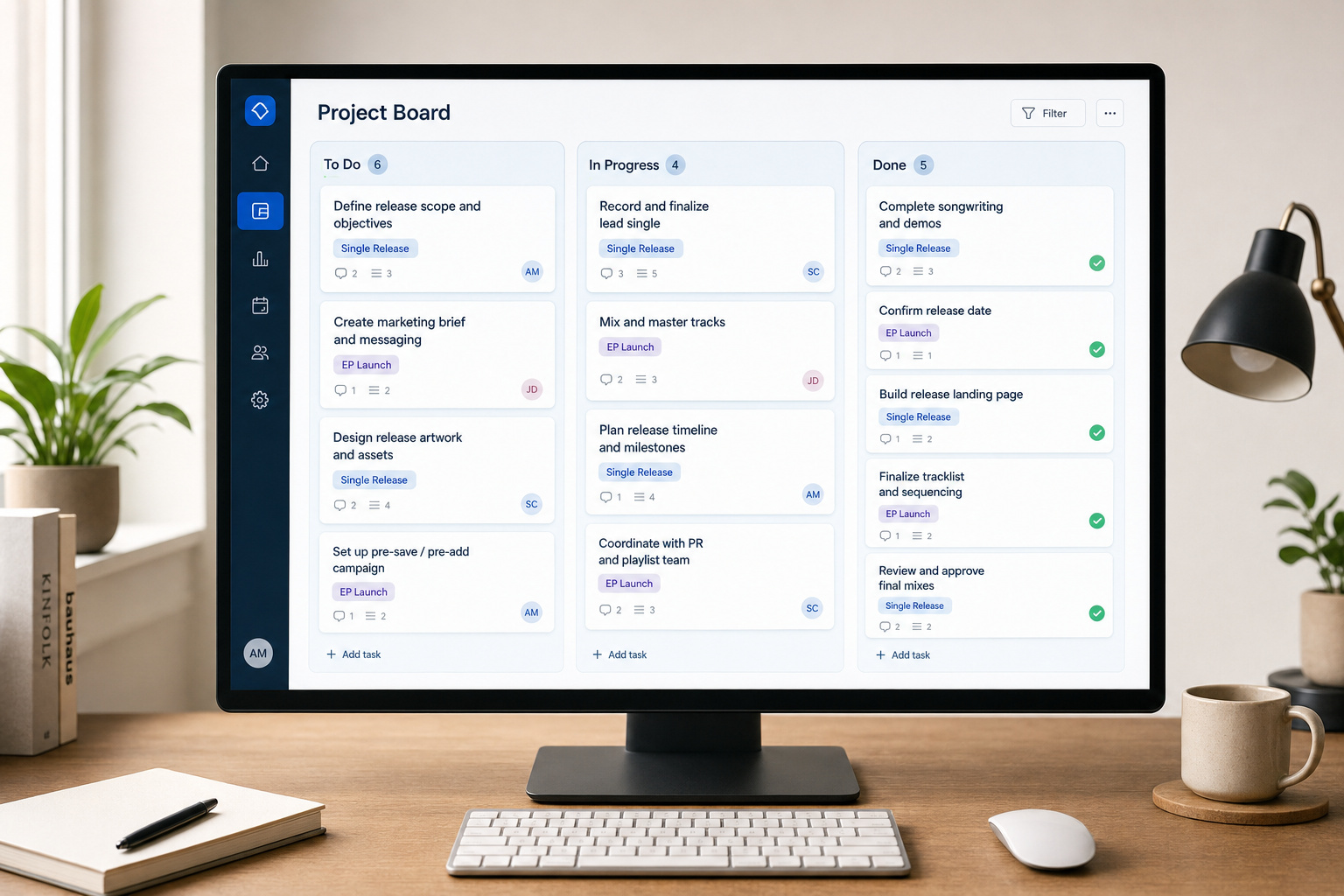
Most task tools strip out the context that makes a to-do meaningful. Music Artist Manager's Task Board keeps every task attached to the project and release it belongs to, so "send masters to mixing engineer" sits under the right release, carrying that release's deadline. When a manager in the chat writes you a plan, the tasks appear for review and import straight onto the board, project-linked and ready to work.
Most task tools assume all work is flat. A ticketing system or a checklist app treats "send masters to mixing engineer" the same way it treats "reply to booking email" or "file PRS registration". Same priority weight, same visual hierarchy, same disconnection from the thing it actually serves.
That doesn't survive contact with a release schedule. When you're managing two EPs, a single rollout, three reworks and a backlog of admin, context is the difference between executing a task on time and chasing it three weeks after the release window closed.
This is written for independent artists and managers who run more than one project at a time, who have worked through at least one release, and who have felt the gap between a plan in a document and the actual structure needed to hold everyone accountable.
The structural problem with flat task lists
A flat task list gives you a checkbox and a due date. It does not tell you which release the task belongs to, which phase of the project it sits in, or what else has to happen before it or after. That information lives somewhere else: in a release doc, a voice note, a DM thread, or inside someone's head.
The result is predictable. Tasks get completed in the wrong order. Dependencies aren't visible. A delay in one project cascades invisibly into another. The list becomes a liability instead of a system.
What you need is a task structure that carries the same project context the work actually has. If a task belongs to a release, it should sit attached to that release, inheriting its deadline and showing its position in the sequence. If it belongs to a touring block or a licensing push, the same rule applies.
How Music Artist Manager's task board links tasks to projects
Music Artist Manager's Task Board, at /planner/tasks, is a Kanban-style board where every task is linked directly to the project it belongs to. A task like "confirm mastering turnaround" doesn't float in a general list. It sits attached to the specific release it serves, carrying that release's own deadline and sitting in the correct column for its current status.
The board layout is Kanban: columns for stages like "To do", "In progress", and "Done". But unlike a general-purpose Kanban tool, every card on the board carries project context. You see which release the task is for, what the project deadline is, and where the task sits in the sequence.
This matters most when you're running multiple releases at once. A task for Release A and a task for Release B might both have a due date this Friday, but one is in pre-production and the other is two days from distribution. The board shows that difference without requiring you to open three other documents.
Tasks feed directly from manager chat
The Task Board isn't only filled in manually. It's also fed directly from manager chat. When you're working with one of the functional managers in Music Artist Manager and the conversation produces a plan, the resulting tasks are detected, shown for review with checkboxes, and assigned to the right project in one action.
The mechanic works like this. You ask the Release manager to map out the next six weeks for an EP rollout. The manager produces a plan with dates, phases and specific actions. At the end of the response, those actions appear as a checklist. You review the list, tick the tasks you want to import, and confirm. The tasks land on the Task Board, already linked to the EP project, already carrying the release deadline.
The same mechanic runs in reverse for a content schedule, which imports into the Calendar instead. The practical effect is that a conversation with a manager can turn directly into a structured, project-linked task list without manual re-entry.
Why project context changes task execution
When a task carries project context, three things change.
You can prioritise by project, not just by date. If two tasks are both due Friday but one belongs to a release that drops next week and the other belongs to a licensing pitch with a flexible window, you know which one to push. A flat list doesn't surface that decision.
Dependencies become visible. If mastering has to finish before distribution setup can start, and both tasks sit attached to the same release, you can see the sequence without cross-referencing a separate doc. The board shows what's blocking what.
Handoffs are clearer. If you're managing a team, a task attached to a project makes it obvious what the work is for and what else is happening in that project. The person picking up the task doesn't have to ask for context. The board carries it.
Who this structure serves
This is not a tool for someone managing one release and nothing else. If you have three tasks and a single deadline, a note on your phone works fine.
This is for the artist running two releases in parallel while chasing sync placements and filing royalty claims. It's for the manager coordinating a band's EP rollout, a solo artist's rebrand, and a backlog of admin that never got filed. It's for anyone who has looked at a task list and thought, "I know I wrote this down, but I can't remember which release it's for."
If you've ever missed a task because it was buried in a flat list with no project anchor, or if you've ever had to explain to a collaborator which release a task belongs to because the tool didn't carry that information, this is the structure that fixes it.
What it doesn't do
The Task Board does not chase tasks on its own. It does not send reminders, flag overdue items automatically, or score your completion rate. It's a board. You fill it, you move the cards, you mark tasks done. The managers in Music Artist Manager give advice on what should be on the board and when. You decide what gets added and what gets actioned.
It also doesn't replace a release doc or a detailed project plan. The board is for execution, not for strategy. The strategy lives in the release plan, the marketing brief, the split sheet. The Task Board is where the resulting actions go so they don't get lost.
How to structure a release using the task board
Start with the release as the anchor. Create the project in Music Artist Manager, set the release date, and use that project as the parent for every task
Ready to plan your next release?
Stop piecing together spreadsheets and scattered notes. Get your free release strategy and keep your whole rollout in one place.
Written By
Gavin Alexander
Senior Marketeer
As the founder of Music Artist Manager, Gavin has spent years at the intersection of music and technology. Seeing firsthand how chaotic release rollouts and split sheets can be, he designed a platform that brings major-label infrastructure to independent artists and their teams. He writes extensively about industry trends, artist leverage, and workflow optimisation.