Releases: Manage current and back catalogue from one page
How to build a public artist page that separates current releases from catalogue without hiding older work or rebuilding every time you drop.

Key Takeaways
Most link-in-bio tools dump your entire catalogue into a single chronological list with no editorial control.
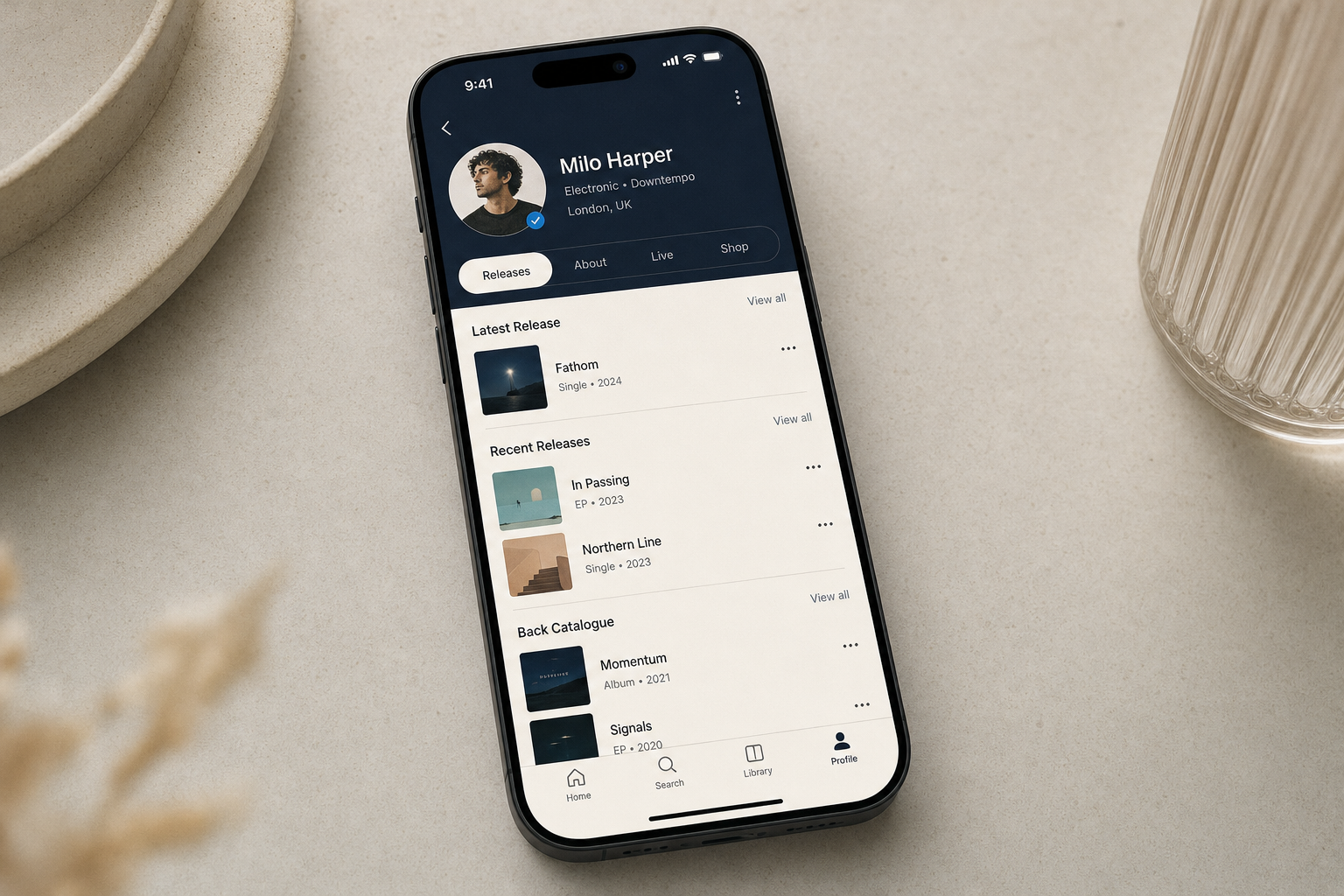
Music Artist Manager separates current releases from back catalogue and lets you reorder everything manually.
You can add releases directly from Spotify or enter them manually before they go live on streaming.
Edit controls only appear when you're logged in, so your public page stays clean for visitors.
Most artist link-in-bio tools give you a flat list of releases with no way to separate current work from back catalogue, and no path to add anything that isn't already live on a DSP. Music Artist Manager's Releases feature does both: pull in what's on Spotify now, add what isn't yet out, and control the order visitors see when they land on your page.
Your artist page is the first place someone lands when they want to hear your music. If it's out of date, they leave. If it's cluttered, they guess. If it only shows this year's output, they miss the catalogue track that might have been the reason they clicked through in the first place.
Most link-in-bio tools treat releases as a flat chronological list. Everything lands in release-date order, and there's no clean way to separate what's current from what's catalogue. Worse, if a release isn't already live on a streaming platform, you're stuck: you can't add it until it's out, which means your page can't reflect what you're working on or what's coming next.
Music Artist Manager's Releases feature solves both problems. It gives you two ways to add a release (Spotify lookup for anything already live, manual entry for everything else), lets you reorder what visitors see first, and shows edit controls only to you. The page stays current without manual rebuilding, and your back catalogue stays visible without cluttering the top of the list.
Two paths in: Spotify lookup and manual entry
There are two ways a release lands on your artist page, and which one you use depends on whether the release is already out.
Add release from Spotify searches Spotify directly and pulls in a release that's already live. The search runs via Spotify's own API, so if it's on the platform, it appears in your results. You select the release, it imports with artwork and metadata intact, and it's live on your page. This is the fastest route for anything that's already distributed.
Manual release entry covers everything else. Singles that haven't been released yet. Catalogue work that never made it onto streaming services. Pre-digital-era releases that only exist on vinyl or CD. You enter the release title, format, release date and artwork yourself, and it appears on your page exactly as you've described it. This is the same mechanism used for back catalogue import, with one difference: when you mark a release as archived, it's visibly separated from current work. That separation is automatic once the status is set. You're not managing two different features.
Reordering: What a visitor sees first is your decision
Releases appear on your page in an order you control. There's a dedicated reordering endpoint that lets you move releases up or down the list, so the single you're promoting this month can sit at the top even if it's not your most recent release by date.
This matters when you're running a campaign. If you've got a lead single that's driving traffic, you don't want it buried below a catalogue EP just because that EP came out a week earlier. Visitors see what you've chosen to put first, and you can change that decision as the campaign evolves.
Owner-only edit controls: Safe to leave live
The artist page is public. Anyone with the link can see it. But edit controls (the add button, the reorder interface, the archive toggle) only appear when you're logged in as the page owner. Visitors see the finished page. You see the editing tools.
This is what makes it possible to use the page as your primary artist link without worrying about exposing admin functions. The page can stay live at all times, and you can update it without taking anything offline or switching to a separate dashboard view.
Why this setup works for release cycles
A new single drops, and you need the artist page to reflect that within the hour. With a flat chronological list, you'd add the single and hope it lands in the right place. With no manual-entry path, you'd wait until distribution is live and then hope the platform's integration picks it up.
Music Artist Manager's Releases feature removes both waits. If the single is already on Spotify, you search and import. If it's not, you enter it manually. If you want it at the top of the page regardless of release date, you reorder. The page updates immediately, and visitors see the current work first.
The same logic applies to back catalogue. Older releases don't disappear, but they don't clutter the top of the page either. The archive status keeps them visible and accessible without requiring a visitor to scroll past ten years of EPs to find this month's single.
What this replaces
Before this, keeping an artist page current meant one of three approaches. First option: rebuild the page manually every time you released something new, re-uploading artwork and re-entering metadata. Second option: rely on a streaming platform's auto-generated artist page, which you don't control and which only shows what's on that platform. Third option: use a link-in-bio tool with a flat release list, where everything appears in date order and nothing can be prioritised or archived.
None of those options let you add unreleased work, reorder based on campaign priority, or cleanly separate catalogue from current output. Music Artist Manager's Releases feature does all three, and it does them in a single interface that doesn't require you to log out, switch tools, or take the page offline to make changes.
The operational detail
The public artist page lives at `/p/[userId]`. It's served from a public-profile API, which means it loads quickly and doesn't require a login to view. The Releases section is one part of that page, and it's the part that gets updated most often.
When you add a release from Spotify, the lookup runs via a client-credentials API call. That's a direct query to Spotify's catalogue, not a cached or delayed integration. You search, you see results, you select, it imports. The release appears on your page with the same artwork, title and metadata Spotify holds.
When you add a release manually, you're writing directly to your own profile data. The release isn't dependent on any external platform. If you're adding an unreleased single, you enter the planned release date. If you're adding a 1998 CD-only EP, you enter the original release date. The page treats both the same way, and the archive toggle is what determines whether it appears in the current list or the catalogue section.
Reordering uses a dedicated endpoint, which means it's not a client-side hack. You move a release, the order persists, and it stays that way until you change it again.
Who this is for
This feature is built for any artist who treats their public page as an active part of their release strategy, not an afterthought. If you're running a single campaign, you need the page to reflect the current priority. If you've got a back catalogue that still drives streams, you need it visible but not in the way. If you're releasing new work before it hits DSPs (pre-saves, vinyl-only drops, Bandcamp exclusives), you need a way to add it before distribution goes live.
Music Artist Manager's Releases feature handles all three cases without requiring you to maintain multiple pages, rebuild manually, or wait for a platform integration to catch up.
What to do next
If you're managing releases across multiple artist pages, link-in-bio tools, or manual HTML edits, consolidate them into Music Artist Manager. Use the Spotify lookup for anything already live, manual entry for anything else, and the reorder function to reflect your current campaign priority. Set older work to archived so it's available but not competing for attention with this month's single. The page updates immediately, and you don't rebuild it again until your strategy changes.
If you're running a release campaign and your artist page hasn't been updated since the last single, that's the gap this feature closes. Add the new release, move it to the top, and the page reflects your current work within minutes.
Ready to plan your next release?
Stop piecing together spreadsheets and scattered notes. Get your free release strategy and keep your whole rollout in one place.
Written By
Gavin Alexander
Senior Marketeer
As the founder of Music Artist Manager, Gavin has spent years at the intersection of music and technology. Seeing firsthand how chaotic release rollouts and split sheets can be, he designed a platform that brings major-label infrastructure to independent artists and their teams. He writes extensively about industry trends, artist leverage, and workflow optimisation.