Is this release actually making money? the project financial ledger
Track whether each release actually paid for itself, project by project, without folding everything into one account total.

Key Takeaways
The account-level expense view tells you how the business is doing. It doesn't tell you if a release paid off.
Project-scoped ledgers matter when you're running multiple releases. One profitable single can hide an album campaign that hasn't recouped.
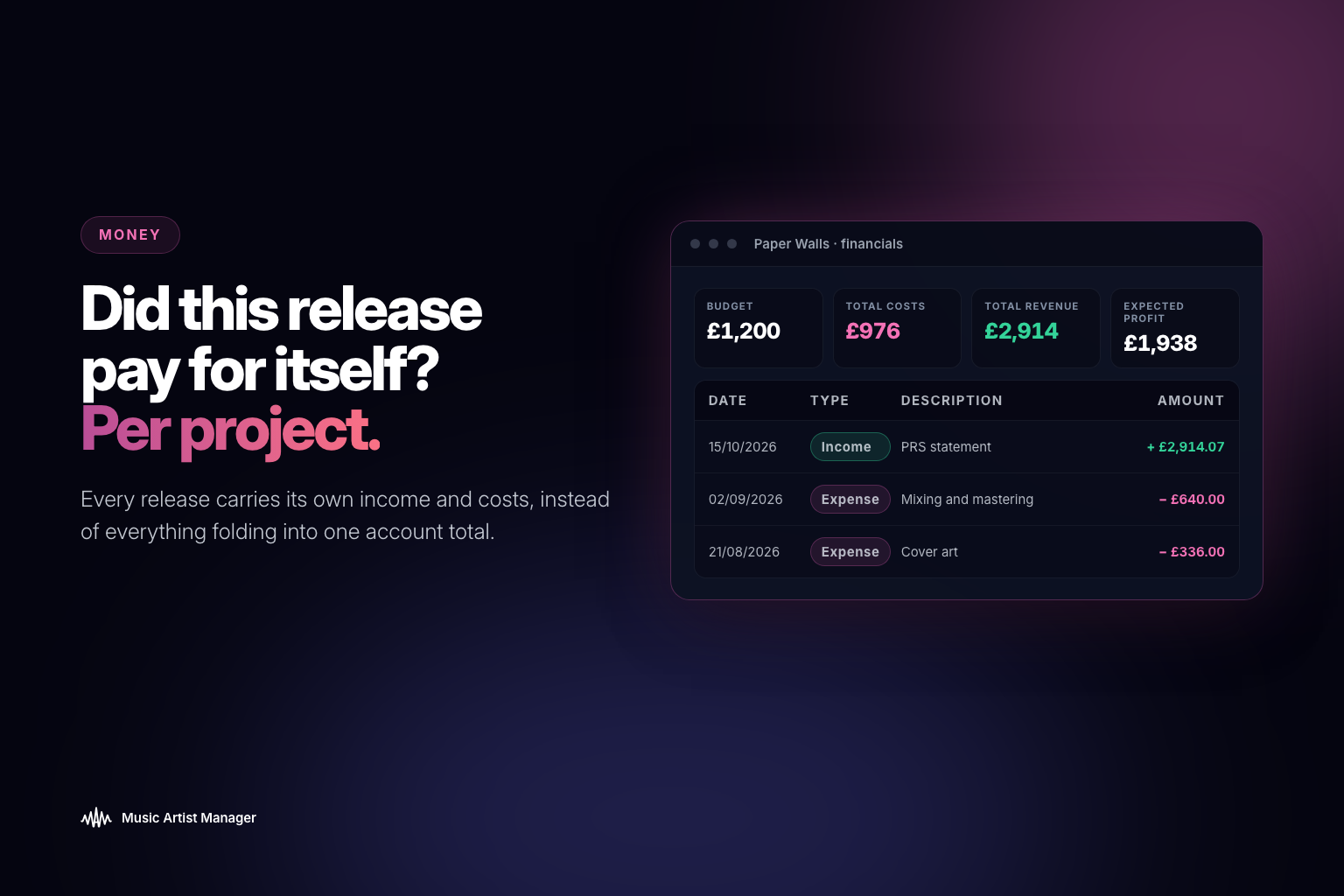
The Project Financial Ledger sits on the release itself, alongside tracks, team splits and strategy. Income versus cost, by project.
Use it to decide whether the last release was worth it before you commit budget to the next one.
If you're running more than one release at a time, you already know the problem: your general expenses view tells you what the whole business spent, but it doesn't tell you whether that specific single actually paid for itself. The Project Financial Ledger sits inside each release and gives you the one number that matters: income versus cost, per project, so you know which campaigns recouped and which ones didn't before you commit budget to the next one.
You released a single in June. Marketing spend sat at £1,200. Three months later, streaming income is trickling in, a sync fee landed, and you've had two small payments from live performances of the track. Question: are you up or down?
Most artists can't answer that without opening three spreadsheets, a banking app, and a distribution dashboard, then spending twenty minutes reconciling dates and guessing which expense belonged to which release. By the time the picture is clear, you're already halfway into the next campaign.
The Project Financial Ledger in Music Artist Manager solves that by keeping income and cost attached to the release itself, not buried in an account-wide total. It's a per-project view: what this specific release cost to make and promote, set against what it has earned back so far. One number, one place, updated as new income or expenses land.
Why account-level totals don't answer the real question
Music Artist Manager already has a general Expenses view at account level. It tracks overall spending, categorises transactions, and shows whether the business as a whole is profitable month on month. That's useful. It's also not enough.
A single release has its own economics. If you fold everything into one account-wide ledger, a profitable single gets averaged out against an album campaign that cost £8,000 and hasn't recouped yet. The result is a vague sense that you're spending money, but no clarity on whether the thing you just released was worth doing.
The Project Financial Ledger scopes the numbers to the release. Income and cost are logged against the project that generated them, so you can see whether that particular piece of work paid for itself. Not "is the business profitable," but "did this release make money."
Who this is built for
Anyone running more than one project at a time needs to know which releases are paying for themselves and which aren't. That includes:
- Artists managing their own catalogue. You released three singles this year. One is profitable. One broke even. One is still £600 in the red. Without release-level numbers, you can't make an informed decision about where to put budget next.
- Managers running projects across a roster. Four artists, six releases in the past twelve months. The account-level profit-and-loss statement tells you the company made money. It doesn't tell you which artist's release funded the others, or which campaign should have been smaller.
- Anyone preparing to commit budget to a new campaign. If the last release hasn't recouped and you don't know that before greenlighting the next one, you're guessing with money you might not have.
The Project Financial Ledger is where the comparison actually happens, because the numbers are already split by project rather than lumped together.
What goes into the ledger
The Project Financial Ledger tracks two categories of transaction, both scoped to the release:
Income
- Streaming royalties (linked from your distribution account or imported via PRS statement data)
- Sync fees
- Performance income
- Merchandise tied to the release
- Any other revenue stream you log manually against the project
Costs
- Recording, mixing, mastering
- Distribution fees
- Marketing spend (ads, PR, playlist pitching services)
- Artwork and video production
- Session musician fees
- Any other expense you've assigned to that project
Each transaction is timestamped. The ledger shows running totals, so you can see whether the release is in profit or still recouping, and how the balance has shifted over time.
How it fits with the rest of Music Artist Manager's money tools
The Project Financial Ledger is one piece of a broader financial system inside Music Artist Manager. It doesn't replace the other views. It complements them:
- Expenses view (/planner?tab=expenses): Account-level spending. Categorised, searchable, month-on-month tracking of how the business is doing overall.
- Invoices: The tool for creating, sending and tracking payment on client invoices. If you're a manager billing artists or labels, or an artist invoicing for a session, that's where it happens.
- PRS royalty statement import: Pulls income data directly from PRS PDF statements (currently in beta). That revenue gets logged to your account, and if it relates to a specific release, it can feed into the Project Financial Ledger automatically.
The Project Financial Ledger is specifically the release-level view. It answers "did this one project, on its own, pay off," rather than "is the business healthy" or "did that client pay me."
Why release-level accounting actually matters
Most independent artists treat profitability as a feeling. "The campaign went well" or "streaming was disappointing" or "we spent too much on the video." Those impressions might be accurate. They might also be completely wrong, because the data is scattered and no one has added it up.
Release-level accounting turns impressions into numbers:
- You know whether the single that felt like a success actually recouped, or whether it just had good engagement but terrible economics.
- You know whether the album campaign that felt expensive was expensive relative to what it earned, or whether it was justified by sync income you hadn't been tracking properly.
- You know which marketing tactic on which release actually moved the revenue needle, because the cost and the income are sitting side by side in the same ledger.
That matters most when you're making decisions about the next release. If you don't know whether the last one was profitable, you're either overspending out of optimism or underspending out of caution, and both guesses cost money.
What it looks like in practice
You released a single on 15 March. By the time you open the Project Financial Ledger on 15 June, three months later, it shows:
Income
- Streaming royalties: £340
- Sync fee (ad placement): £800
- Live performance income tied to the track: £120
- Total income: £1,260
Costs
- Mastering: £80
- Distribution (annual fee, apportioned): £15
- Artwork: £150
- Facebook and Instagram ads: £600
- Playlist pitching service: £200
- Total costs: £1,045
Net: +£215
The release is profitable. Not by much, but it's in the black, and you know that before committing budget to the next campaign. If the number had been -£500, you'd know that too, and you'd have a clear picture of where the money went and whether any of it was worth repeating.
When to check the ledger
The Project Financial Ledger isn't a set-and-forget dashboard. It's a tool you return to at specific decision points:
- Before committing budget to a new release. If the last project hasn't recouped and you're about to spend another £1,500, that's a decision you should make with your eyes open.
- Three months post-release. Streaming income usually stabilises by then. The ledger will show whether the campaign was cost-effective or whether the spend was disproportionate to what came back.
- At the end of a funding period. If you've had a grant, an investor or a loan, the Project Financial Ledger is the proof that the money was spent on specific releases and what those releases earned in return.
- When planning catalogue strategy. If you're deciding whether to keep promoting an older release or move on, the ledger tells you whether continued spend is likely to be worth it based on how the project has performed so far.
Who shouldn't use this
If you're releasing one track a year and your only income source is Spotify, the Project Financial Ledger is overkill. A spreadsheet will do the job.
It's built for artists and managers running multiple projects simultaneously, where income and cost need to be separated by release to make any sense. If your catalogue is small and your revenue streams are simple, you don't need release-level accounting yet. When you do, it's here.
The bottom line
The Project Financial Ledger is the tool that tells you whether a release was worth doing. Not whether it got playlist adds, not whether engagement was good, but whether the money that came back was more than the money that went out.
That's not a vanity metric. It's the number that determines whether you can afford to do it again.
Related Reading:
Ready to plan your next release?
Stop piecing together spreadsheets and scattered notes. Get your free release strategy and keep your whole rollout in one place.
Written By
Gavin Alexander
Senior Marketeer
As the founder of Music Artist Manager, Gavin has spent years at the intersection of music and technology. Seeing firsthand how chaotic release rollouts and split sheets can be, he designed a platform that brings major-label infrastructure to independent artists and their teams. He writes extensively about industry trends, artist leverage, and workflow optimisation.