Personalised invoice emails that still look like you wrote them
Write invoice emails once using tokens like {{firstname}} and {{totalamount}}, then send personalised messages without retyping a word.

Key Takeaways
Templates cut the time cost without sounding like a form letter.
Tokens swap placeholders for real invoice data at send time.
Personalisation happens per invoice without retyping the same message.
It sits inside the invoicing workflow, not as a separate tool.
Most musicians write the same invoice email over and over, or send a cold generic note to save time. Music Artist Manager's invoice email templates use tokens like {{firstname}} and {{totalamount}} to swap in real data when you hit send, so every email reads personal without rewriting a word.
Sending invoices is routine. Writing a personal-sounding email to go with every single one isn't. Most people either skip the personal touch and paste a generic note, or write it fresh each time and lose five minutes they didn't have.
Music Artist Manager's Invoices feature covers the invoice itself: line items, a split-pane preview, payment terms, the ability to cc a manager, UK VAT and multi-currency handling, and sending straight from the app. Sitting on top of that is a smaller, specific mechanic worth its own explanation: invoice email templates with tokens.
How the tokens work
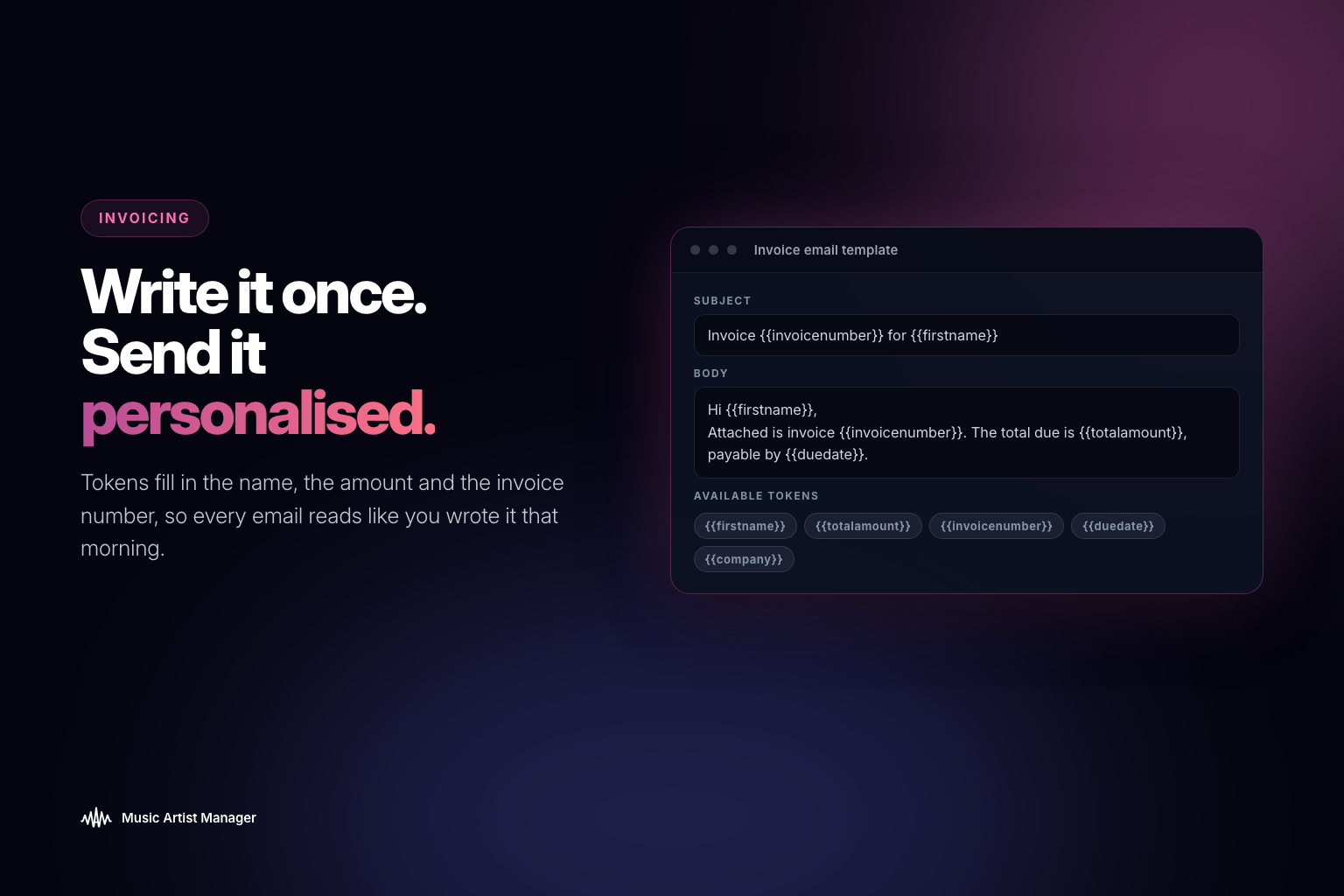
Instead of writing a new email every time an invoice goes out, a template is written once using placeholder tokens. Things like `{{firstname}}`, `{{projectname}}`, `{{totalamount}}` and `{{sendername}}`, among others. When the invoice is sent, Music Artist Manager swaps each token for that specific invoice's real data. The result reads like it was written for that client, that project, that amount. Because functionally, it was. Without anyone retyping a word.
Why this matters for a working musician or manager
Anyone invoicing more than one client or collaborator ends up sending some version of the same email repeatedly: a reminder of what the work was, the amount, when it's due. Doing that by hand either costs time per invoice or costs a bit of warmth in the message. The generic "please find attached" email.
Tokenised templates remove that trade-off. The same effort produces a personal-feeling email every time.
Where it sits in the workflow
This is a feature of the invoicing workflow, not a separate tool. It uses the sender name, reply-to address and other defaults set up in Invoice Settings, and the actual delivery goes through the same invoice-sending mechanism as any other invoice in Music Artist Manager. The template itself is the only new thing to think about: write it once, let the tokens do the personalising from then on.
Who this is built for
If you invoice session work, production, mixing, mastering, management commission, publishing admin or sync coordination, you're probably billing multiple clients in a month. Each one expects a note that acknowledges the specific project and the specific amount. Writing that note individually takes time. Skipping it makes you look like you're firing out boilerplate.
This feature is for anyone who wants their invoice emails to read like they were written one-to-one, without actually writing them one-to-one.
Writing a template once
A good invoice email template includes:
- A greeting that uses the client's first name
- A reference to the project by name
- The total amount being invoiced
- The payment terms or due date
- A clear line about how to pay, or where the invoice is attached
- Your name at the close
Here's what that looks like in template form:
Hi `{{firstname}}`,
>
Invoice attached for `{{projectname}}` — total is `{{totalamount}}`, due `{{duedate}}`.
>
Payment details are on the invoice. Let me know if you need anything adjusted.
>
`{{sendername}}`
When that invoice goes out to a client named Sarah, for a project called "EP masters", totalling £800, due in 14 days, the email reads:
Hi Sarah,
>
Invoice attached for EP masters — total is £800, due 15 May 2025.
>
Payment details are on the invoice. Let me know if you need anything adjusted.
>
Alex
That's a one-time template doing the work of a hand-written email, every time.
The tokens you can use
Music Artist Manager supports a set of tokens that pull data directly from the invoice being sent:
- `{{firstname}}` – the client's first name
- `{{lastname}}` – the client's last name
- `{{projectname}}` – the name of the project on the invoice
- `{{totalamount}}` – the total invoice amount, formatted in the invoice's currency
- `{{duedate}}` – the due date, formatted as set in Invoice Settings
- `{{sendername}}` – your name, as entered in Invoice Settings
- `{{invoicenumber}}` – the unique invoice number
Each token gets replaced with live data when the invoice is sent. If the data isn't available, the token is left blank rather than breaking the email.
The time saved is real
If you send ten invoices a month, writing a unique email for each one costs roughly 50 minutes. That's time spent retyping the same structure, checking names, confirming amounts, pasting payment terms. A single template written once removes all of that.
This isn't about automation. It's about not rewriting the same thing when the structure doesn't change. The email still sounds like you, because you wrote it. It just doesn't cost you five minutes every time you bill someone.
What this doesn't do
Invoice email templates don't send invoices on your behalf. They don't chase unpaid invoices. They don't flag overdue payments or export reminders. Music Artist Manager's Invoices feature provides the template and token system, but you still decide when to send, to whom, and with what message. The template gives you the starting point. You review it, adjust it if needed, and send it when you're ready.
Where to set this up
Invoice email templates are configured in the Invoices feature at `/planner/invoices`. The sender name, reply-to address and payment terms that populate the tokens are set in Invoice Settings at `/settings/invoicing`. Once the template is written and the settings are confirmed, every invoice sent from Music Artist Manager uses that template unless you edit it manually before sending.
The case for doing this once
Most invoicing problems aren't about the invoice itself. The line items, the tax calculation, the currency conversion — those are table stakes. The friction is in the small repeated tasks around the invoice: writing the email, confirming the amount, checking the name, making sure it doesn't sound like a mail merge.
Tokenised templates solve that specific problem. Write it once, with the same care you'd put into any client email. Let the tokens do the personalising every time after that. The result is an invoice email that reads like it was written for that person, because in functional terms, it was.
Ready to plan your next release?
Stop piecing together spreadsheets and scattered notes. Get your free release strategy and keep your whole rollout in one place.
Written By
Gavin Alexander
Senior Marketeer
As the founder of Music Artist Manager, Gavin has spent years at the intersection of music and technology. Seeing firsthand how chaotic release rollouts and split sheets can be, he designed a platform that brings major-label infrastructure to independent artists and their teams. He writes extensively about industry trends, artist leverage, and workflow optimisation.