Resource hub: Guides, courses and templates filtered by what you need
Five filtered categories, in-app courses with progress tracking, and templates you can use without leaving your planner.

Key Takeaways
Resource Hub turns scattered advice into a filtered library inside the tool you already use daily.
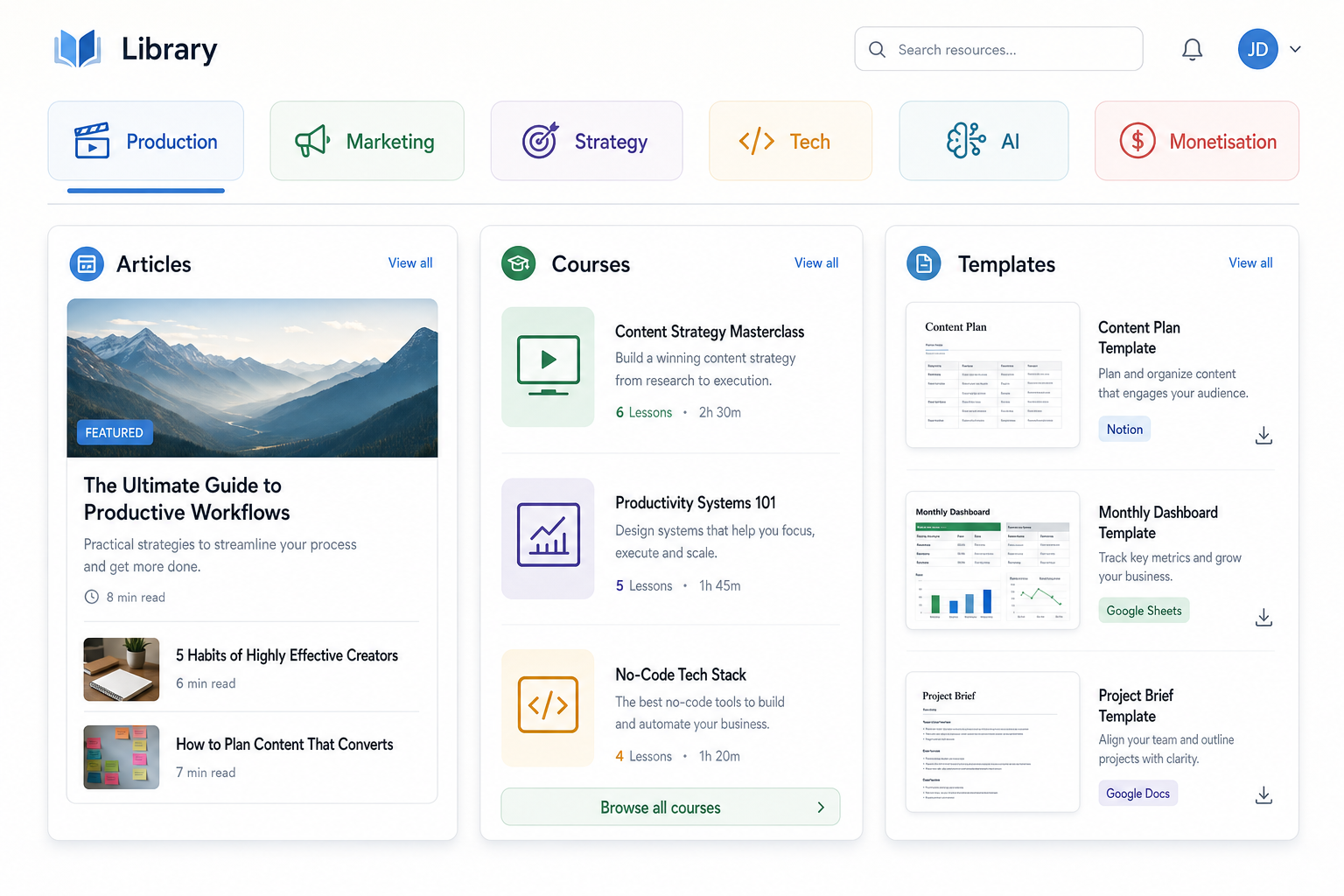
Five categories let you jump straight to Production, Marketing, Strategy, Tech or Monetisation without scrolling a flat feed.
The Course Player tracks your progress across multi-lesson courses so you can work through them at your own pace.
Every guide, course and template lives at /planner/resources, reachable without leaving your planner.
If you've ever tabbed away from your planner to Google 'how to register a track with PRS' or 'what split percentage should I offer a producer', you've felt the problem. Advice for independent artists lives scattered across blogs, forums and half-remembered bookmarks, so the thing you need is never where you are when you need it. Resource Hub puts a filtered library of guides, courses and templates inside Music Artist Manager, structured by the five categories that map to real problems: Production, Marketing, Strategy, Tech and AI, and Monetisation.
You're two hours into prepping a single release and you've hit a wall on ISRC registration. Or you need a split sheet template but the last one you saved is buried in an email thread from 2022. Or you remember reading something about playlist pitching windows but the article is on someone's Substack and you don't remember whose.
The information exists. Finding it when you need it does not.
Resource Hub is a filtered library of guides, courses and templates inside Music Artist Manager. It lives at /planner/resources and it's structured around the five areas where independent artists and managers actually get stuck: Production, Marketing, Strategy, Tech and AI, and Monetisation. No flat feed, no scrolling past irrelevant posts. You pick a category and you get a shortlist.
What's in there
Articles, multi-lesson courses and templates. All of it sourced from the same content system that runs the public blog, but accessed inside the planner so you don't have to break focus.
Articles open in the in-app viewer. Read them, reference them, close them when you're done. No new tabs.
Courses run in the Course Player, which tracks your progress across lessons. If you're working through a multi-part series on distribution deal mechanics or royalty collection, the player remembers where you stopped.
Templates are for direct use. Split sheets, release checklists, whatever needs filling in rather than reading.
The five categories
Production covers recording, session management, file delivery specs, mixing notes, mastering handoff. The tangible work of making the thing you're going to release.
Marketing is rollout timing, pre-save setup, playlist pitching mechanics, press angles, social strategy that ties to actual release dates rather than vague consistency advice.
Strategy deals with catalogue sequencing, release windows, feature negotiation, long-term planning that connects one release to the next.
Tech and AI handles the tools side: distribution platforms, royalty registration systems, metadata standards, payout reconciliation, and yes, how intelligent technology fits into a real workflow.
Monetisation is sync licensing basics, neighbouring rights collection, direct-to-fan revenue models, commission structures, and the actual mechanics of getting paid for the work.
Each category is a distinct problem. If you're stuck on a production question, you don't need to scroll past three marketing how-tos to find the answer.
Who this is for
Any Music Artist Manager user who needs structured reference material or a full course without leaving the tool to go hunt it down on the public site.
If you're an independent artist running your own releases, Resource Hub gives you a reference shelf that sits inside the planner you're already using. If you're a manager working with multiple artists, it's a quick-access library for the operational questions that come up mid-rollout.
The Course Player specifically suits anyone working through a multi-part course rather than a single article. Progress tracking means you can stop mid-lesson and pick up where you left off without hunting for your place.
Why it's structured this way
A flat blog list makes you work too hard. You have to remember what you're looking for, scan past everything that isn't it, and hope the title gives you enough of a clue.
Filtering by category turns the hub into something closer to a reference shelf. You know the shape of your problem. You pick the category that matches it. You get a shortlist of relevant guides, not a chronological feed.
This isn't a community feature or a forum. It's a library. You read it, you work through it, you apply it. No collaboration, no comments, no discussion threads. Just the information you need when you need it.
How to use it
Log into Music Artist Manager. Go to /planner/resources. Pick the category that matches your current problem. Open the article, start the course, or grab the template.
If you're mid-rollout and you hit a question about royalty registration, go to Monetisation. If you're planning your next three releases and you need to think through catalogue sequencing, go to Strategy. If you're two weeks out from release day and you need a press angle, go to Marketing.
It's reachable without leaving the planner. That's the point.
What it isn't
Resource Hub is not a feed of motivational quotes or surface-level social tips. It's not a community space. It's not a place to ask questions or get live advice. That's what Manager chat is for.
This is a library. Guides you can reference. Courses you can work through. Templates you can use. It's structured, filtered, and built for the moment when you need an answer and you don't have time to hunt.
If you're already a Music Artist Manager user, it's live at /planner/resources. If you're not, it's part of the planner when you sign up.
Ready to plan your next release?
Stop piecing together spreadsheets and scattered notes. Get your free release strategy and keep your whole rollout in one place.
Written By
Gavin Alexander
Senior Marketeer
As the founder of Music Artist Manager, Gavin has spent years at the intersection of music and technology. Seeing firsthand how chaotic release rollouts and split sheets can be, he designed a platform that brings major-label infrastructure to independent artists and their teams. He writes extensively about industry trends, artist leverage, and workflow optimisation.