Import your existing catalogue into Music Artist Manager with a CSV
How to load your entire catalogue into Music Artist Manager in one pass using CSV import, and why it matters most on day one.

Key Takeaways
CSV import brings your existing catalogue into Music Artist Manager in one pass, not project by project.
Manual entry is the fastest way to abandon a new tool before you've seen what it can do.
Every project becomes the foundation for splits, financials, tasks and release strategy once it's in the system.
This matters most when you switch platforms, not during day-to-day use after onboarding.
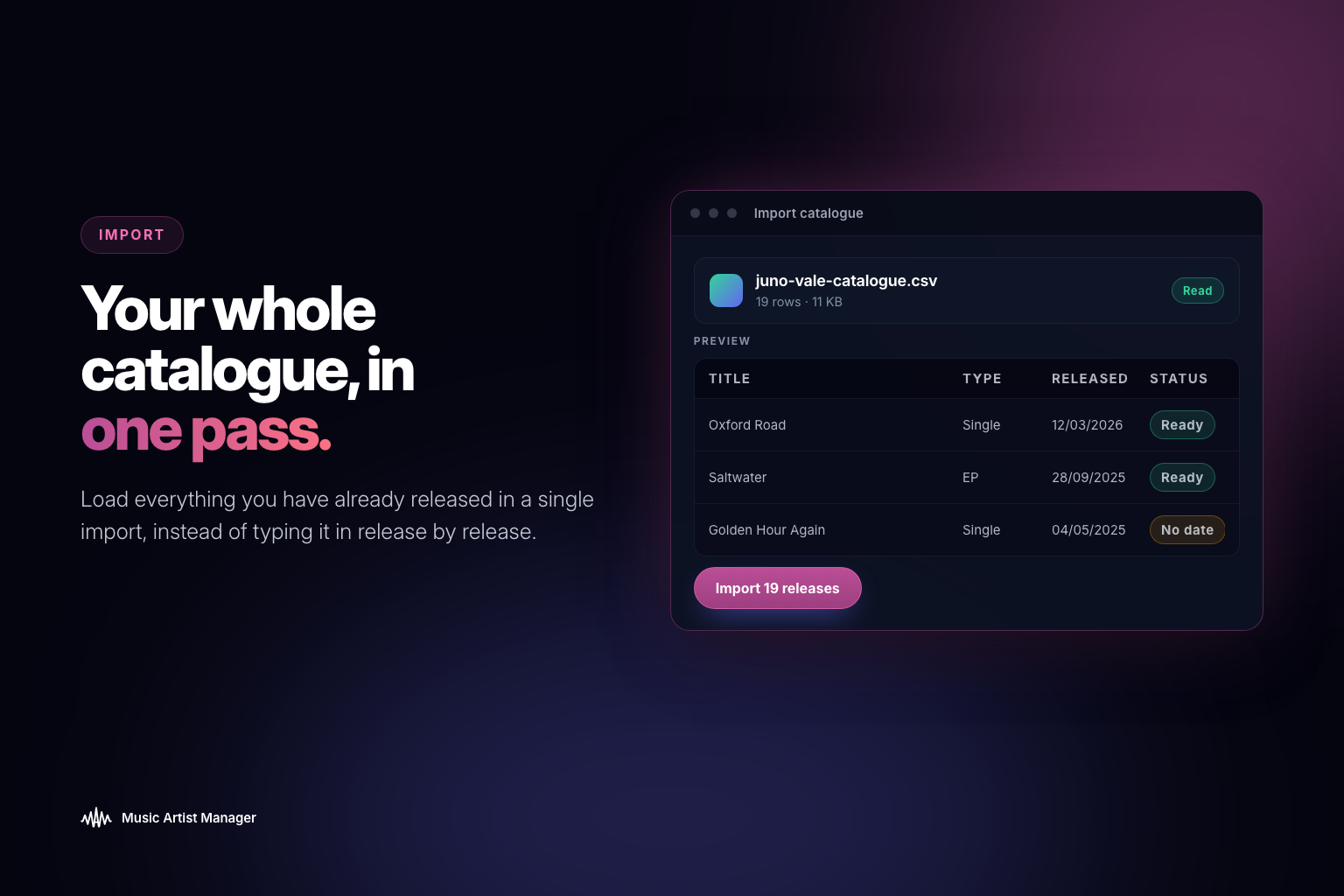
If you're switching to Music Artist Manager with a back catalogue already tracked somewhere else, typing in every release one at a time is the kind of friction that stops you using the tool before you've got anything out of it. CSV Project Import takes a spreadsheet of past releases and loads the whole catalogue as Projects in one pass. You get your roster history, release log or back catalogue sitting inside your financial ledger, task board and split sheets from day one, instead of starting empty with a backlog of manual entry in the way.
The first time you log in to a new project management tool shouldn't cost you a day's work. But that's exactly what happens when you're staring at an empty account and a spreadsheet full of past releases.
If you've been tracking your catalogue anywhere else—a Google Sheet, a label's internal log, an old management system—you already have that data. The question is whether your new platform makes you re-enter it one project at a time, or whether it respects the work you've already done.
CSV project import is the difference between those two outcomes. It's a bulk loader that takes your existing catalogue and creates Projects inside Music Artist Manager in a single pass, not one at a time.
Who this is actually for
This feature matters most at the point of switching, not during regular use.
You're a manager picking up a new client mid-career. They've got 15 releases out, half a dozen sync placements, three merch drops, and two tours. All of that lives in various spreadsheets or old Notion boards. If you have to manually create each of those Projects one by one before you can start using split sheets, task tracking, or the financial ledger properly, you've just added hours of admin before the tool does anything useful.
You're an artist who's been independent for three years. You've released an EP and seven singles. You've been tracking your own metadata and splits in a spreadsheet because nothing else was worth the subscription cost. Now you're trying out Music Artist Manager, and the idea of typing in every ISRC, release date, and collaborator again makes you want to close the tab.
CSV import solves that. You map your existing columns to the fields Music Artist Manager expects, upload the file, and your catalogue becomes a set of Projects you can immediately start working from.
What actually gets imported
Music Artist Manager treats a Project as the core unit everything else connects to. A Project can be a single release, an album, a tour, a merch drop, or an event. Each Project then holds tracks, team assignments, financials, splits, DSP links, and strategy work.
CSV import creates the Projects themselves. The shell.
What you're importing:
- Project title
- Project type (release, merchandise, tour, event)
- Release date or event date
- Status (released, upcoming, archived)
- Basic metadata fields you've been tracking
What you're not importing in bulk:
- Split percentages per collaborator
- Financial history or royalty statements
- Task lists or calendar entries
- DSP performance data
Those still get added per Project, same as if you'd created each one manually. The value isn't in pre-populating every detail across your catalogue. The value is in not having to create dozens of empty Projects by hand before you can start filling them in.
How this fits with the other ways to add projects
Music Artist Manager gives you three ways to create a Project, depending on the situation.
Quick add Project is title-only. You're in the middle of something, you need to log a new release or event fast, and you'll come back to flesh it out later. One field, done.
Project onboarding wizard walks you through the full setup for a brand-new Project. Title, type, collaborators, release date, strategy notes. This is what you use when you're planning a new release from scratch and want to populate the structure as you go.
CSV import is for when you're not creating one new thing. You're migrating a history. It's the complement to the other two, not a replacement. You use it once, at the beginning, to get your existing catalogue into the system so you can start working from real data instead of an empty account.
What it doesn't do
This is a bulk-create mechanism. It doesn't generate splits, tasks, or financial entries automatically based on the import. If you want to track who's owed what on a release from two years ago, or log the advance you recouped on an old tour, you still add that information inside each Project after the import completes.
The reason for that is simple. Split percentages, payment terms, and task ownership are specific to the people and the deal. A CSV can't know that your co-writer on track three gets 25% because they wrote the hook, or that your tour manager's invoice is still outstanding from your last run. That context lives with you, and you bring it in where it matters.
What CSV import removes is the repetitive part: creating the same Project containers over and over when you already have the list.
Why this matters at switch time
Most people don't abandon a new tool because it's missing a feature. They abandon it because using the feature they signed up for requires too much setup work before they see any return.
If you're trying out Music Artist Manager because you want better split tracking, or clearer financial visibility, or a single place to manage your catalogue and your team, the first thing you need is your actual catalogue inside the platform.
Without CSV import, that means opening the add-project flow, typing in a title, selecting a type, adding a date, saving, and repeating that 20 times before you can do anything else. That's not a first-use experience. That's a barrier.
With CSV import, you map your existing spreadsheet once, upload it, and your catalogue is live. Then you can actually start using the split sheets, the financial ledger, the task board, and the calendar on real Projects you care about.
What you need to prepare
Your existing catalogue data doesn't have to be perfect. It just has to have the core fields Music Artist Manager needs to create a Project.
At minimum:
- Project title (the release name, tour name, or event title)
- Project type (release, merchandise, tour, event)
- A date (release date, event date, or tour start date)
Useful but optional:
- Status (released, upcoming, archived)
- Any metadata fields you've been tracking that map to Music Artist Manager's structure
The import process includes a column-mapping step. You tell Music Artist Manager which column in your CSV corresponds to which field in a Project, and it handles the rest. If your spreadsheet calls it "Release Name" and Music Artist Manager expects "Project Title", you just map one to the other.
When to use this
You use CSV import once, right after you sign up, if you have an existing catalogue.
After that, you're adding Projects as they come up, either through quick add or the full onboarding wizard. CSV import isn't part of your regular workflow. It's a migration tool.
That said, if you're a manager picking up a new client mid-year, or a label onboarding a new roster, you'll use this every time you're bringing a new artist's history into the platform. It's not a one-time-only feature. It's a one-time-per-catalogue feature.
What happens after the import
Once your Projects are in, they behave exactly like any other Project you'd create manually. You can open each one, add collaborators, log splits, attach financial records, link DSP profiles, add tasks, and build out the strategy.
The only difference is you didn't spend a day creating empty containers. You spent ten minutes uploading a CSV, and now you're working from your real catalogue instead of a blank slate.
That's the whole point. You already did the work of tracking your releases. CSV import makes sure Music Artist Manager respects that, instead of making you do it twice.
Related Reading:
Ready to plan your next release?
Stop piecing together spreadsheets and scattered notes. Get your free release strategy and keep your whole rollout in one place.
Written By
Gavin Alexander
Senior Marketeer
As the founder of Music Artist Manager, Gavin has spent years at the intersection of music and technology. Seeing firsthand how chaotic release rollouts and split sheets can be, he designed a platform that brings major-label infrastructure to independent artists and their teams. He writes extensively about industry trends, artist leverage, and workflow optimisation.