Music Artist Manager's ten advisor personas, explained
Manager chat reads your actual splits and finances, then turns the advice into real tasks on your board.

Key Takeaways
Manager chat has your real splits, real tasks and real finances already in context when it answers.
Ten distinct personas let you switch from brand positioning to playlisting strategy without starting the conversation again.
Plans turn into tasks with one click. The board imports directly from the conversation instead of copying manually.
Contract review prepares you for the negotiation. It surfaces the terms worth discussing, never replaces your solicitor.
Manager chat in Music Artist Manager isn't a generic chatbot. It has your actual splits, tasks and finances in context when it answers, and it can turn a conversation about tour routing or release sequencing into real entries on your task board. Here's how it works, what it costs in credits, and when it matters more than another Notion doc.
You've got three release windows open in separate spreadsheets, a split sheet in your email drafts, and a list of tasks scattered across Notes. The advice you need is strategic. The person who could give it doesn't have the full picture because assembling it takes twenty minutes you don't have.
This is the structural problem behind most management advice tools: they give you generic answers because they don't have your specific numbers. Music Artist Manager runs the other way. Manager chat starts with your real data already in context.
Eight managers, one data set, zero repetition
Rather than one general assistant that tries to cover everything, the AI inside Music Artist Manager is framed as ten distinct personas. Each one answers from a different strategic lens, but they're all reading the same underlying state: your actual projects, splits, registered works, and task board.
The Assistant is the default. General management questions, day-to-day priorities, tactical planning. This is where you start if the question isn't obviously specialist.
The Brand Architect handles positioning, visual strategy, and cultural fit. You're deciding between two photoshoot directions or trying to work out whether a collaboration damages your lane? Brand.
The Distro Hacker is DSP strategy and playlisting mechanics. Release timing, pre-save sequencing, playlist targeting, catalogue optimisation for algorithmic reach.
The Tour Veteran knows logistics, routing, deal structure for live. Routing a support run, working out per-diems, negotiating backend versus guarantee.
The Content Strategist builds rollout calendars. What posts when, which format on which platform, how to sequence content around a release without burning out your own attention span first.
The A&R Architect thinks catalogue direction and artist development. Which song should close the EP, whether the next project should widen your sound or deepen it, how the last three releases add up as a body of work.
The Equity Advocate addresses representation, access, structural barriers. The less visible mechanics of how the industry actually works for artists without institutional capital behind them.
The Contract Lens reviews an agreement and prepares you for the conversation about it. This is not legal advice, and it's never described as such. It's prep work so you walk into the room knowing which clauses matter and what questions to ask.
The Executive Council runs several of these personas together on the same question, so you get multiple lenses at once rather than switching between them manually.
My AI is the bring-your-own-model slot. If you want to run this through your own LLM via API key instead of Music Artist Manager's configured routing, you attach it in settings and it replaces the default.
What matters across all ten: they already have your data. Your registered splits, your task list, your release schedule. The AI doesn't start blind.
From a chat reply to actual tasks on the board
Generic advice stays in the chat window. Operational advice turns into calendar entries and tasks you can action without retyping anything.
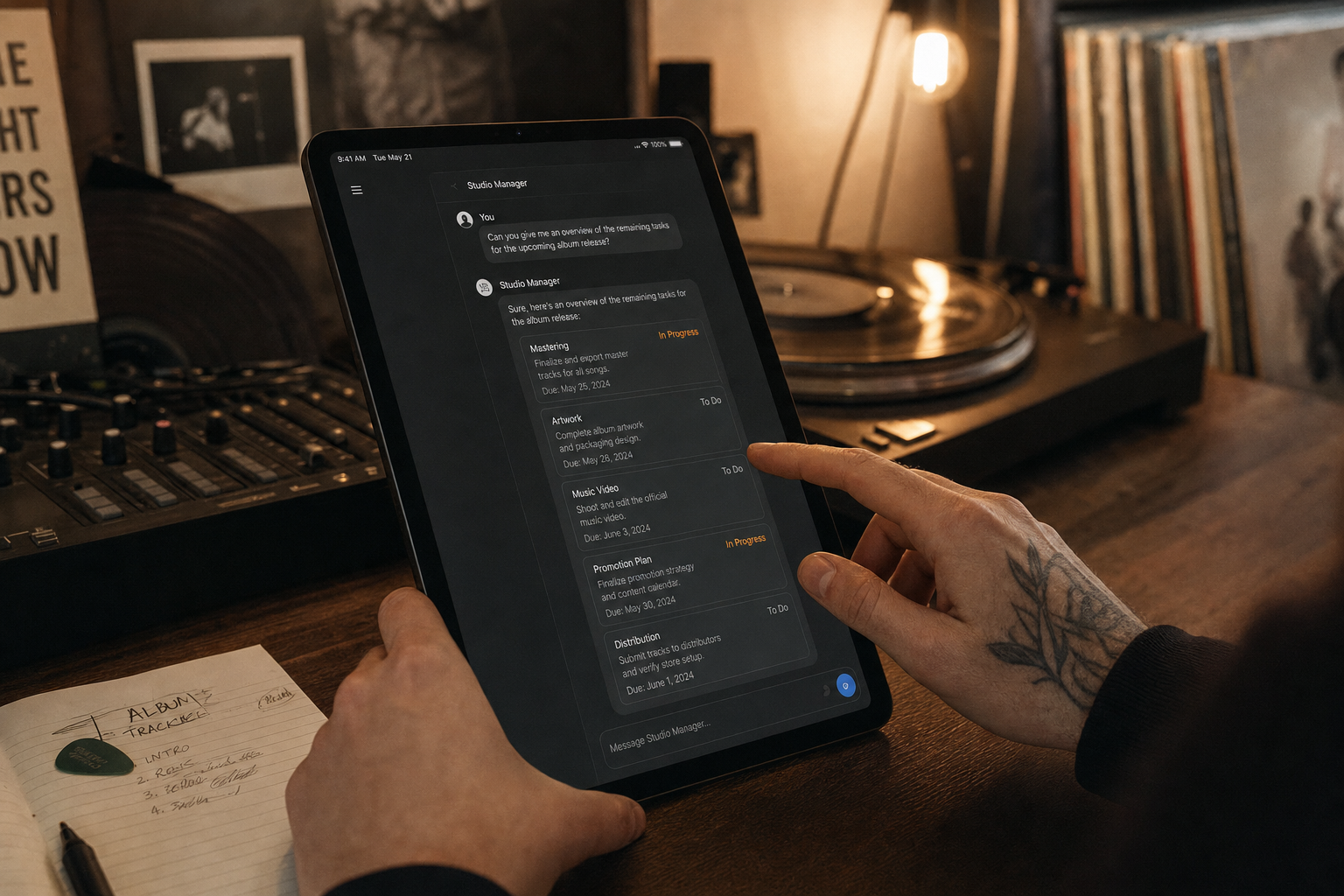
When the AI produces a plan inside its own answer, Music Artist Manager detects the actionable steps, surfaces them as checkboxes for review, and lets you assign them to a specific project. One action imports them straight into your Kanban board.
The same mechanism applies to a content schedule. The chat suggests a rollout calendar, you approve it, and it populates your actual calendar rather than staying hypothetical in a transcript.
This is why the data matters. The AI isn't guessing at your release date or working from a template schedule. It's reading your registered project, your splits, your existing task list, and building a plan that slots into what's already there.
Document parsing, voice input, and what happens when it doesn't know
You can attach a contract, a royalty statement, or a booking offer directly into chat. The document parsing route at `/api/chat/parse-document` reads it, and the AI can answer questions about it without you summarising the whole thing first.
Voice works both ways: speak your question, get a spoken reply if you want one. That's useful when you're in a car between venues or trying to plan something while your hands are on a mixing desk.
If the AI is missing something it needs to answer properly, it asks for the specific piece of information rather than producing a generic reply anyway. A PRS registration number. A projected budget. A known split. It won't fake the answer.
Model routing, credit limits, and the honest constraint
Music Artist Manager runs on a model-routing layer. It picks a configured primary model, with a premium backup and secondary fallbacks if the first option isn't available. A background cron job monitors model availability so the system switches without you noticing a failure state.
This isn't unlimited. AI usage is metered through a credit allowance that resets on your plan schedule. Heavier use will push you toward a higher tier, and that's by design. The structure keeps costs predictable and prevents one account hammering the backend while others wait.
If you want to avoid that gate entirely, bring your own API key through the My AI integration. You manage the model and the usage yourself, and Music Artist Manager routes through it instead.
The difference worth naming
Most management tools with an AI layer bolt the chatbot on top and hope you tell it everything it needs. That means every conversation starts from zero. You describe your project, your timeline, your splits. The AI doesn't remember because it was never told in the first place.
Music Artist Manager assembles the AI's system prompt from your real account state. The session starts with your data already loaded, so the question you ask gets answered in context rather than hypothetically.
The distinction isn't subtle when you're five projects deep and trying to sequence a catalogue or plan a tour budget. A manager who already knows your numbers gives better advice than one who has to be briefed from scratch every single time.
That's the pitch. Manager chat with ten strategic lenses, all of them reading your actual data, all of them able to turn a conversation into tasks and calendar entries you can action today. No legal advice, no unlimited credits, no pretence that this runs itself. Just the specific advice you'd expect from someone who sat in the room and saw the spreadsheet before the meeting started.
Ready to plan your next release?
Stop piecing together spreadsheets and scattered notes. Get your free release strategy and keep your whole rollout in one place.
Written By
Gavin Alexander
Senior Marketeer
As the founder of Music Artist Manager, Gavin has spent years at the intersection of music and technology. Seeing firsthand how chaotic release rollouts and split sheets can be, he designed a platform that brings major-label infrastructure to independent artists and their teams. He writes extensively about industry trends, artist leverage, and workflow optimisation.