Reading a PRS royalty statement without losing an afternoon to it
Learn how to upload your PRS statement PDF and turn dense royalty rows into categorised income entries you can actually use.

Key Takeaways
PRS statements typically arrive as multi-page PDFs that most independent artists either ignore or spend hours manually retyping.
The statement import feature parses your PDF line by line, extracts each track's revenue, then shows you a review screen before committing anything.
Every parsed line becomes a proper income entry in your project ledger, searchable and categorised alongside your other financial records.
This only handles PRS-format statements specifically, and you still check the parsed lines before they land in your books.
PRS statements are dense, multi-page PDFs full of cryptic codes and tiny per-line payments that most independent artists either ignore or spend an evening manually retyping into a spreadsheet. Music Artist Manager's statement import parses the PDF for you, extracts each track-level revenue line, and lets you review and confirm the parsed data before it lands in your financial ledger alongside your other income and expenses. This article walks through what a PRS statement actually contains, why it's confusing, and how the import works end to end.
Your PRS statement arrives three times a year. It's a PDF, usually six to twelve pages, and it contains a list of every broadcasted use of your music that PRS tracked and collected for in that period. Radio play, background music in a shop, television sync, online stream reported through PRS's distribution deals.
Most independent artists open it once, scan to the total at the bottom, feel briefly pleased or disappointed, then never look at it again. The PDF goes into a folder called "accounts" or "statements" or "2024 money stuff", and nobody opens it until the accountant asks for it at year-end.
This is not because you're lazy or bad with money. It's because PRS statements are genuinely hard to read by eye. They're formatted for PRS's internal systems, not for human comprehension. The rows are dense, the codes are cryptic, and there's no clean way to pull the data into anything you actually use day to day.
This article walks through what's actually in a PRS statement, why it's structured the way it is, what the manual alternative looks like if you want to make sense of it, and how Music Artist Manager's statement import handles the whole thing without you retyping 200 rows into a spreadsheet.
What a PRS statement actually contains
PRS for Music is the UK's performing rights collection society. If you're a member, they collect royalties on your behalf whenever your registered works are performed publicly: broadcast on radio, played in a venue, streamed on a platform that reports to PRS, used in a TV programme, or background music in a retail space.
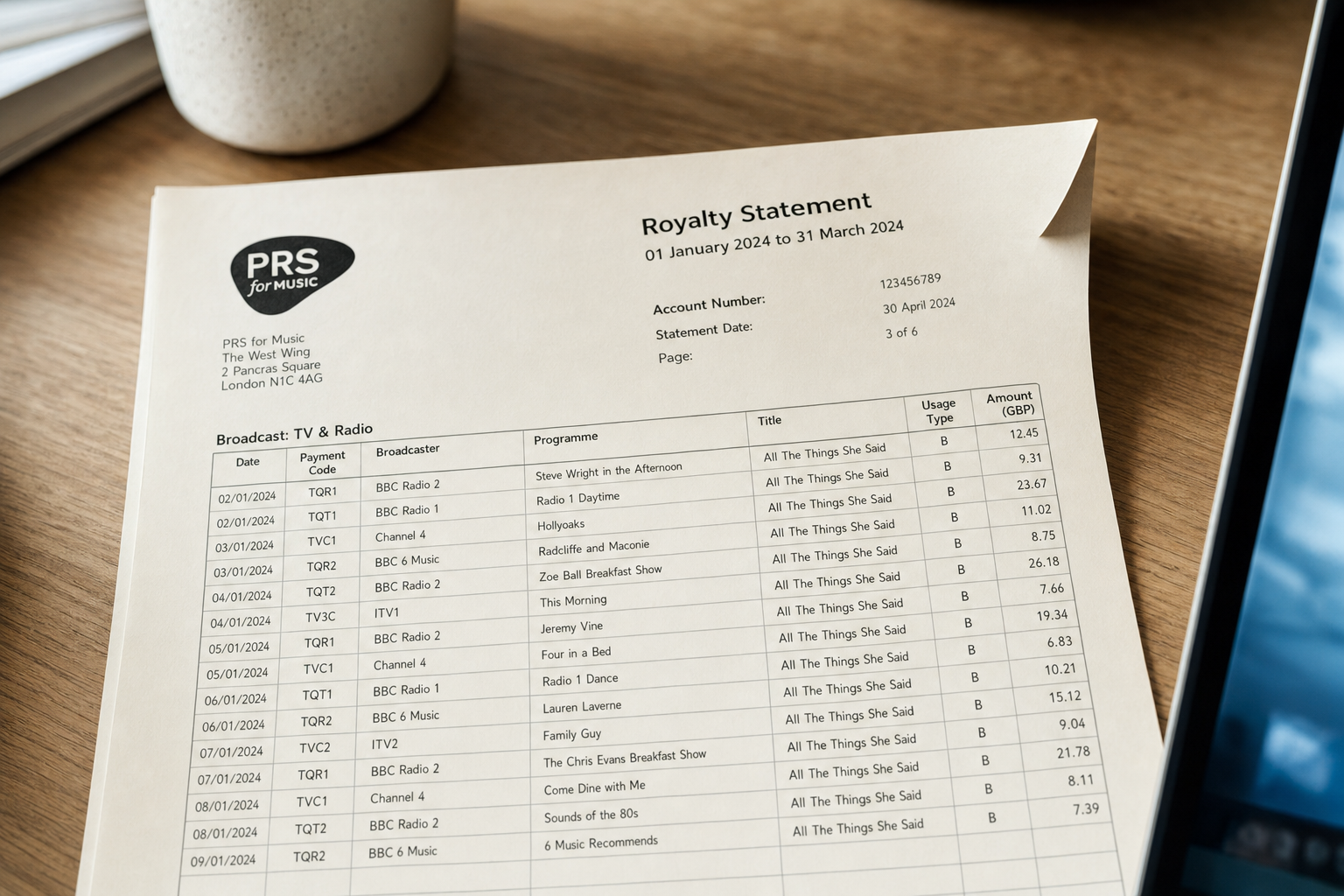
The statement they issue is not a single lump payment with a note saying "here's your money". It's a line-by-line breakdown of every tracked use in that period. Each line typically shows:
- Work title: the song that was performed.
- Usage type: a code or short description. Radio broadcast, online stream, TV sync, live performance reported by a venue.
- Number of uses: how many times it was played or performed in that period.
- Amount: the royalty payment for that specific line, often a few pence or a few pounds per use depending on the type and the broadcaster's weighting.
If you've had any meaningful radio play, TV sync, or playlist inclusion on a platform that reports to PRS, your statement will run to multiple pages. Twenty tracks across fifteen broadcasters and four usage types means 300 line items, not 20.
The format is functional for PRS's purposes. It's a CSV-style table printed to PDF, designed to be auditable and defensible if a publisher or sub-publisher queries a split. It is not designed to be read by an independent artist trying to understand which of their tracks actually earned money this quarter.
Why artists don't read them
Three reasons, all honest.
First: the codes and structure assume you already know how performing rights accounting works. "Live - PRS licence" versus "Online - audio stream reported" versus "Broadcast - national radio". If this is your second PRS statement ever, you don't know which of those is worth paying attention to or which represents a meaningful income stream versus a one-off use.
Second: the per-line amounts are small and hard to pattern-match. £0.47 from BBC Radio 2, £1.23 from Spotify via PRS's distribution agreement, £0.09 from a pub in Manchester that reported your live set. Your brain can't easily add those up into a useful total per track or per platform, so you skim it, feel vaguely annoyed, and give up.
Third: there's no easy way to get the data _out_ of the PDF and into something you actually use. You can't copy-paste a table from a PRS PDF into Excel without it collapsing into a single column of unformatted text. You can't search it usefully. You can't filter by track, sort by amount, or see which of your catalogue actually earned this quarter. So the PDF sits in a folder, and you remember the bottom-line total and nothing else.
This matters because the line-level detail _is_ useful. If one track earned £80 from radio play and another earned £2 from a single pub gig, that's signal. The first track is getting daytime rotation somewhere, and you should probably know that when you're deciding what to release next or which track to push to playlist editors. The second is noise. But if you never actually read the statement, you don't know which is which.
The manual alternative (and how long it actually takes)
If you want to make sense of a PRS statement properly, the manual method is to open the PDF, open a spreadsheet, and retype every line you care about.
Track title in column A, usage type in column B, source in column C, amount in column D. If your statement has 150 lines, that's 150 rows to type. If you're careful and you don't make mistakes, this takes about an hour. If you're less careful, you'll mistype a decimal point or skip a line, and your totals won't match the PDF's grand total, so you'll spend another twenty minutes finding the error.
Once it's in the spreadsheet, you can sort by track, sum by usage type, see which sources actually matter. You can compare this quarter to last quarter if you kept the previous sheet. You can use it as context when your manager asks which tracks are doing well or when your accountant asks for income by category.
Most independent artists do this once, decide it's not worth the time, and go back to ignoring the statements. A small number do it every quarter and treat it as part of their financial admin, the same way they reconcile their distribution payouts or chase invoices.
The honest version: if you're earning less than £100 per quarter from PRS, the hour of manual work probably isn't worth it. If you're earning £500 or more, it absolutely is, because that level of income means your music is being used in ways that matter commercially, and you should know which ways those are.
How Music Artist Manager's statement import works
Music Artist Manager's PRS statement import does the retyping for you, but it doesn't do it silently or automatically. It parses the PDF, extracts the line-level detail, and then shows you the parsed lines in a review step before anything is written into your financial ledger.
Here's the full sequence, step by step.
You upload your PRS statement PDF. PDF only, up to 10MB, and you need to be signed in. This isn't a public tool, it's part of the product.
The server extracts the text from the PDF using a parser that walks the document line by line. It's looking for the structure PRS uses: track title, usage type, source, amount. It identifies each row that looks like a revenue line, not a header or a footer or a page number, and pulls those rows into a candidate list.
The candidate list is shown back to you in what we call the statement injector. It's a table: here are the 180 lines we think we found, here's what we think each one says. You check it. If a track title got misread because the PDF had a weird character encoding, you fix it. If a line shouldn't be included because it's actually a correction from a previous period and you've already logged it manually, you remove it. If everything looks right, you confirm.
This review step is not optional. It exists because a parser that silently wrote wrong numbers into your ledger would be worse than not parsing at all. We treat the parse as a draft until you confirm it's correct.
Once you confirm, each line becomes a proper income entry in your project financial ledger. It's tagged by track, sourced as "PRS - [usage type]", and it sits alongside your other income records: distribution payouts, sync fees, live performance guarantees. It's not a separate silo, it's part of the same ledger you use for everything else.
From that point, it behaves like any other income entry. You can filter by track to see which of your catalogue actually earned. You can filter by date range to compare this quarter to last quarter. You can search for a specific broadcaster or platform. The numbers feed into your month-on-month totals and your executive summaries, so your PRS income is part of the financial picture rather than a forgotten PDF.
Honest caveats
This handles PRS-format statements specifically. Not PPL, not MCPS, not BMI or ASCAP or SOCAN. PRS only, because that's the format we've built the parser for.
The parser works by pattern recognition in the PDF's text layer. If your PRS statement is a scanned image with no selectable text, it won't parse. If PRS changes their statement format significantly, the parser may need an update. This is why the review step exists: so you can catch anything that didn't parse correctly before it's committed.
The upload is capped at 10MB, which covers every standard PRS statement we've seen, but if you're a publisher with 500 writers and a 40-page consolidated statement, it may not fit.
This is not a replacement for your PRS membership or relationship. Music Artist Manager doesn't collect royalties, chase payments, or register works. PRS still does all of that. This tool is purely about turning the PDF they send you into usable numbers inside your existing financial records.
Who this is for
UK-based independent artists and small managers who are PRS members and currently either ignore their statements entirely or manually retype them into a spreadsheet once a quarter.
If you're earning less than £50 per quarter from PRS, this probably doesn't matter yet. The statements are short, the totals are easy to eyeball, and you're not making financial decisions based on which tracks earned what.
If you're earning £200 or more per quarter, the line-level detail starts to matter. That level of income means your music is getting broadcast radio play, significant streaming on platforms that report to PRS, or sync use in TV or advertising. You should know which tracks are driving that income, because it affects what you release next, what you pitch to playlist editors, and which parts of your catalogue are worth investing more time in.
If you're a manager handling multiple artists, the time saved by not retyping four statements per quarter adds up quickly. More importantly, having the parsed data in a single ledger per artist means you can actually compare their PRS income to their distribution income, live income, and costs in the same view, rather than switching between three spreadsheets and a folder of PDFs.
Why this exists as a standalone feature
The inventory audit of Music Artist Manager's own feature set flagged this specifically because "how to read a PRS statement" is a real, underserved search query. PRS members genuinely search for help understanding their own statements, and almost nobody in the independent-artist tool space addresses it with an actual working parser. Most content on this topic is generic explainer copy: "PRS collects performing rights royalties, here's what that means". That's useful if you don't know what PRS is, but it doesn't help you read the statement once it arrives.
This feature exists because the manual alternative is real work, and most artists skip it because it doesn't feel worth the time. If the work can be done by a parser and checked by you in five minutes instead of typed by you in an hour, more artists will actually look at their statements. That means better financial visibility, which means better decisions about what to release and where to spend time.
The goal is not to make PRS statements exciting. They're not. The goal is to make them usable without an hour of retyping, so the data inside them becomes part of your working financial picture instead of a PDF you glance at once and forget.
Ready to plan your next release?
Stop piecing together spreadsheets and scattered notes. Get your free release strategy and keep your whole rollout in one place.
Written By
Gavin Alexander
Senior Marketeer
As the founder of Music Artist Manager, Gavin has spent years at the intersection of music and technology. Seeing firsthand how chaotic release rollouts and split sheets can be, he designed a platform that brings major-label infrastructure to independent artists and their teams. He writes extensively about industry trends, artist leverage, and workflow optimisation.