The executive council explained: Choosing your strategic operating philosophy
During onboarding, you selected an Executive Council. This is not a cosmetic choice. It determines the strategic lens your AI manager applies to every piece of advice, every career assessment, and every recommendation it generates for your project.


Key Takeaways
Each Council option represents a distinct approach to building a music career
The choice affects how your AI advisors prioritise recommendations across business, creative, and distribution decisions
You can update your selection in profile settings — your project data carries over
There is no universally correct choice: the right Council is the one that matches your actual ambitions and operating style
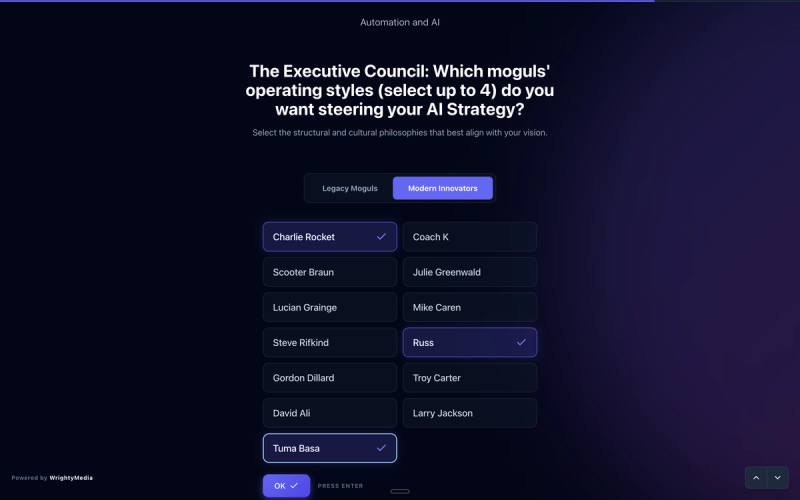
When you set up your Music Artist Manager (MAM) profile, the selection of your Executive Council was far more than a simple onboarding formality. This core configuration establishes the foundational strategic operating philosophy that dictates how your AI manager interprets data, evaluates opportunities, and formulates career advice. Without aligning this council to your actual business model, you risk receiving recommendations that clash with your long-term artistic vision.
Why this matters
Operating under an ill-fitting council philosophy leads to strategic misalignment. For instance, if your true goal is sustainable, grassroots community building but your Executive Council is set to a high-growth commercial philosophy, the platform will continuously urge you to prioritise short-term viral acquisition over long-term relationship development, rendering your strategic advice counter-productive.
How to do it
1. Log in to your MAM dashboard and navigate to the 'Project Settings' menu located in the top navigation bar.
2. Click on the 'Strategic Profile' tab to view your current setup.
3. Locate the section labelled 'Executive Council' and click the 'Review Configuration' button.
4. Review the active profiles of your council members to understand the current lens through which your AI manager processes recommendations.
5. Click 'Modify Council' to open the configuration editor, where you can swap members to adjust your operating philosophy.
6. Select the primary council persona that aligns with your current campaign goal—whether that is commercial scale, independent sustainability, or artistic experimentation.
7. Click 'Save Changes' to apply the new strategic operating philosophy and prompt your AI manager to recalculate your dashboard insights.
Tips
• Avoid switching your Executive Council too frequently; consistency is key to establishing a stable, long-term strategic direction.
• Review your council composition before major campaign launches to ensure the active members are suited to the specific goals of the release.
• Pay close attention to the synergy ratings displayed alongside your council configurations to maximise the coherence of your AI recommendations.
Next steps
Now that you understand the influence of your Executive Council, head to your MAM Workspace and run a fresh 'Career Assessment' to see how your newly calibrated council reframes your immediate strategic options.
Ready to streamline your workflow?
Stop piecing together spreadsheets and scattered notes. Join the waitlist for Music Artist Manager and get your entire rollout in one place.
Written By
Gavin Alexander
Senior Marketeer
As the founder of Music Artist Manager, Gavin has spent years at the intersection of music and technology. Seeing firsthand how chaotic release rollouts and split sheets can be, he designed a platform that brings major-label infrastructure to independent artists and their teams. He writes extensively about industry trends, artist leverage, and workflow optimisation.